AdMob
Cette section explique comment utiliser AdMob avec le plugin Firebase - Features.
AdMob vous aide à monétiser votre application mobile grâce à la publicité. Trois types de publicité sont disponibles.
Pour le développement, vous devez utiliser un ID de pub de test ou votre compte AdMob pourrait être signalé.
Banner View
Les bannières (Banner Views) sont des publicités rectangulaires qui occupent une partie de la fenêtre d'une application. Elles peuvent être rafraîchies automatiquement après un certain temps.
#include "AdMob/FbBannerView.h"
/***********************************************
    Create a banner.
************************************************/
UBannerView* Banner = NewObject<UBannerView>();
/***********************************************
    Later, initialize the banner.
************************************************/
FAdMobAdSize Size;
Size.bAdaptive = true;
// Launch the initialization of the banner.
Banner->Initialize(
    /* The physical dimensions. */
    Size,
    /* The screen position. */
    EAdMobBannerViewPosition::Bottom,
    /* Offsets to avoid system UI overlays. */
    true,
    /* Unique identifier for this banner. */
    TEXT("ca-app-pub-3940256099942544/2435281174"),
    /* Callback invoked once the native SDK setup is complete. */
    FFirebaseAdMobCallback::CreateLambda([](EAdMobError Error)
    {
        if (Error != EAdMobError::None)
        {
            // SDK initialization failed. Check your App ID in the project settings.
            UE_LOG(LogTemp, Error, TEXT("Failed to initialize banner (Error Code: %d)"), (int32)Error);
        }
        else
        {
            // Banner is initialized and ready to load an ad.
        }
    }));
/***********************************************
    Later, load an ad.
************************************************/
FAdMobAdRequest Request;
// Launch the load of the ad.
Banner->LoadAd(
    /* Our request */
    Request,
    /* Set to true to let the SDK manage refresh intervals. */
    true,
    /* Callback when the ad is loaded. */
    FFirebaseAdMobCallback::CreateLambda([](EAdMobError Error)
    {
        if (Error != EAdMobError::None)
        {
            // Failure is often due to No Fill (no ads available) or network issues.
            UE_LOG(LogTemp, Error, TEXT("Failed to load banner ad (Error Code: %d)"), (int32)Error);
        }
        else
        {
            // Ad is loaded and ready to be shown.
        }
    }));
/***********************************************
    Finally, after the ad was loaded, show the ad.
************************************************/
/* Shows the ad */
Banner->Show(FFirebaseAdMobCallback::CreateLambda([](EAdMobError Error)
{
    if (Error != EAdMobError::None)
    {
        // Failed to show the ad as something went wrong. Check the output log for reason.
        UE_LOG(LogTemp, Error, TEXT("Failed to show banner: %d"), (int32)Error);
    }
    else
    {
        // Banner is currently on screen.
    }
}));
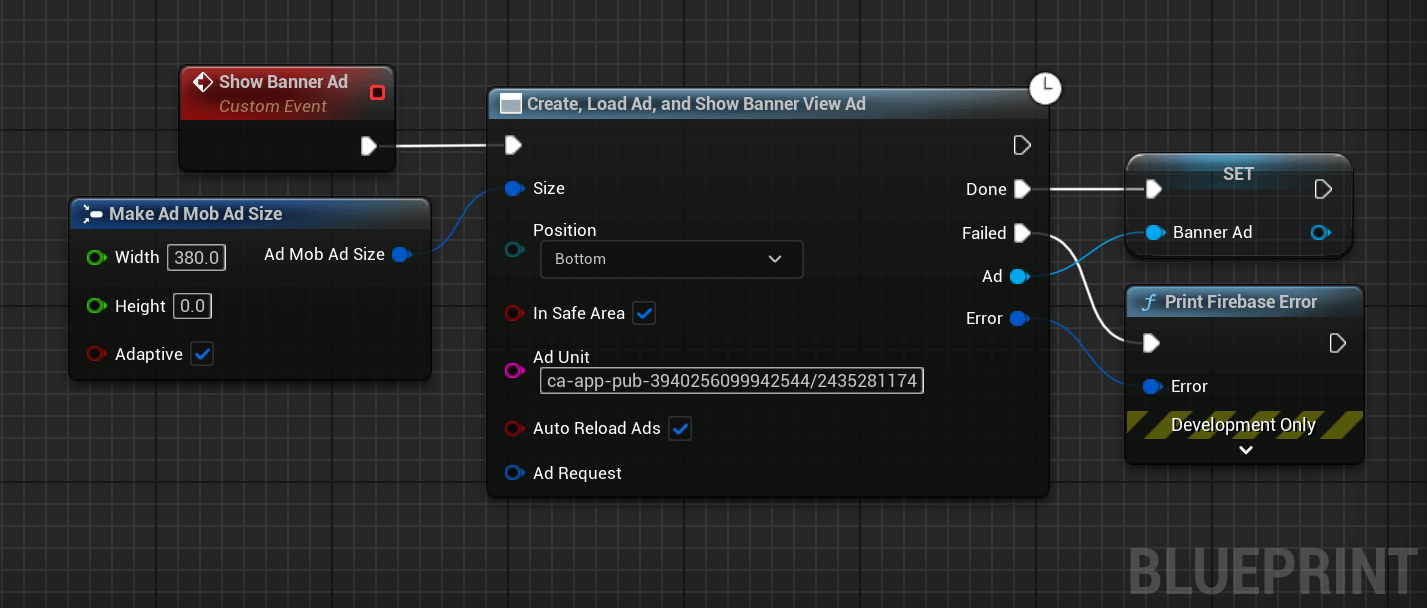
It is possible to easily show a banner using a helper node to create, load et show a banner view.
Make sure to keep the banner in a variable so it doesn't get garbage collected and removed from the screen.
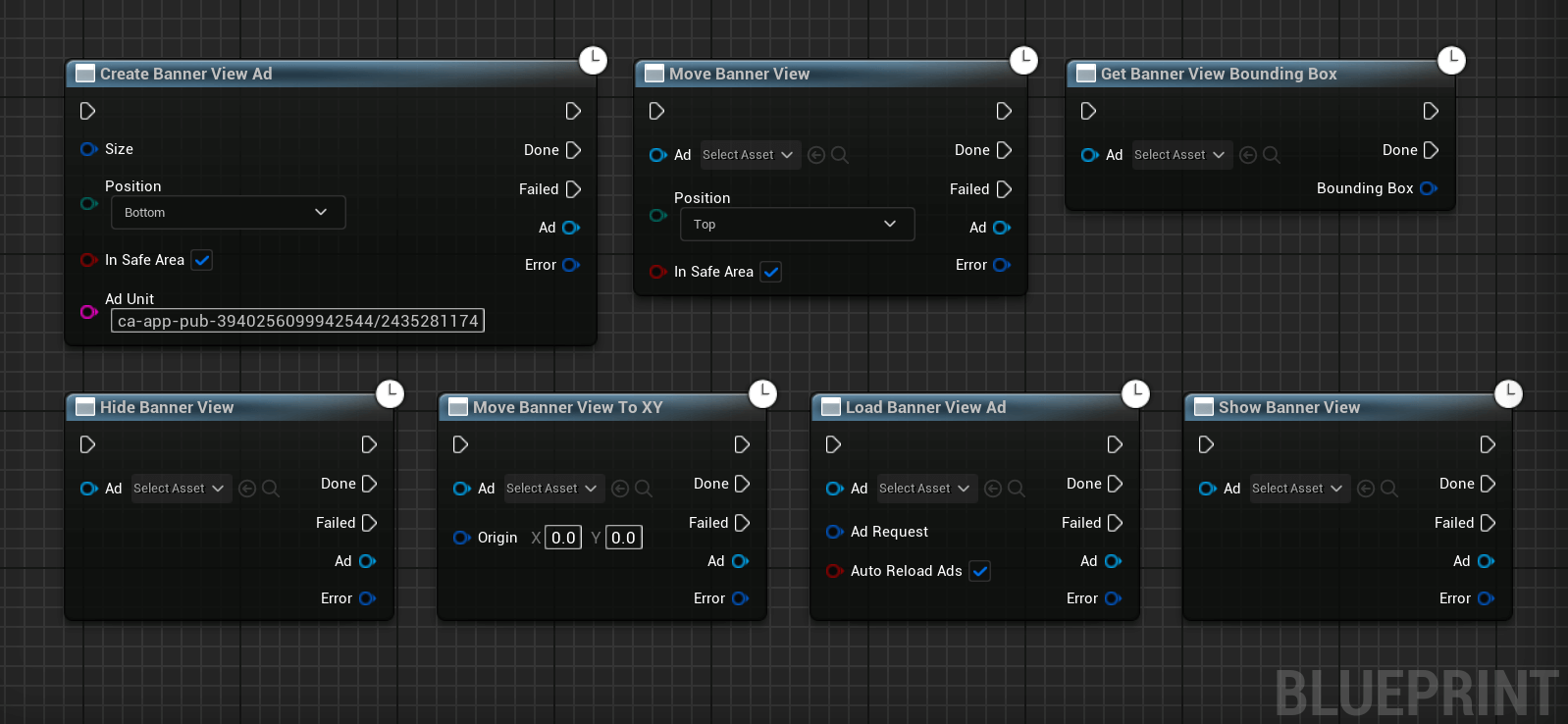
More methods are available to manage the banner:
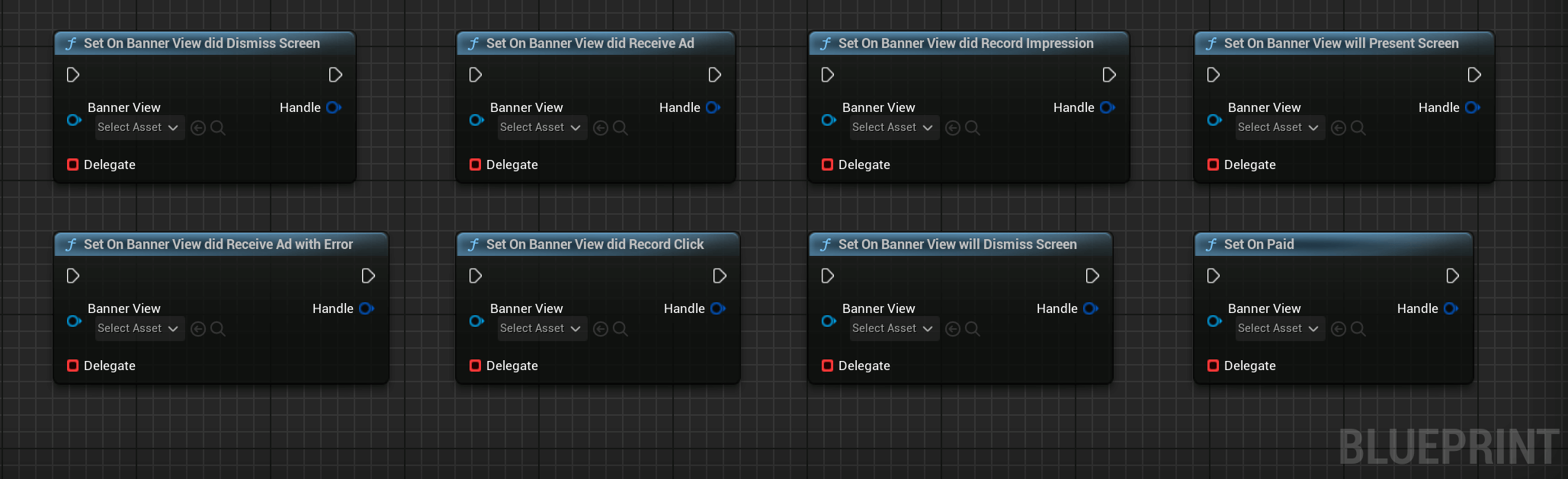
And it is possible to listen for multiple events emitted by the banner:
Interstitial Ads

Interstitial ads are full-page ad format that appear at natural breaks and transitions, such as level completion.
#include "AdMob/FbInterstitialAd.h"
/***********************************************
    Create an interstitial ad.
************************************************/
UInterstitialAd* Interstitial = NewObject<UInterstitialAd>();
/***********************************************
    Later, load the ad.
************************************************/
FAdMobAdRequest Request;
// Launch the load of the ad.
Interstitial->LoadAd(
    /* Unique identifier for this interstitial slot. */
    TEXT("ca-app-pub-3940256099942544/1033173712"),
    /* Our request */
    Request,
    /* Callback invoked once the ad is loaded or failed. */
    FFirebaseAdMobCallback::CreateLambda([](EAdMobError Error)
    {
        if (Error != EAdMobError::None)
        {
            // Failed to load the ad. Check the output log for the reason.
            UE_LOG(LogTemp, Error, TEXT("Failed to load interstitial (Error Code: %d)"), (int32)Error);
        }
        else
        {
            // Ad is loaded and ready to be shown.
        }
    }));
/***********************************************
    Finally, after the ad was loaded, show the ad.
************************************************/
/* Shows the interstitial. */
Interstitial->Show(FFirebaseAdMobCallback::CreateLambda([](EAdMobError Error)
{
    if (Error != EAdMobError::None)
    {
        // Failed to show the ad as something went wrong. Check the output log for reason.
        UE_LOG(LogTemp, Error, TEXT("Failed to show interstitial: %d"), (int32)Error);
    }
    else
    {
        // Ad is currently covering the UI.
    }
}));
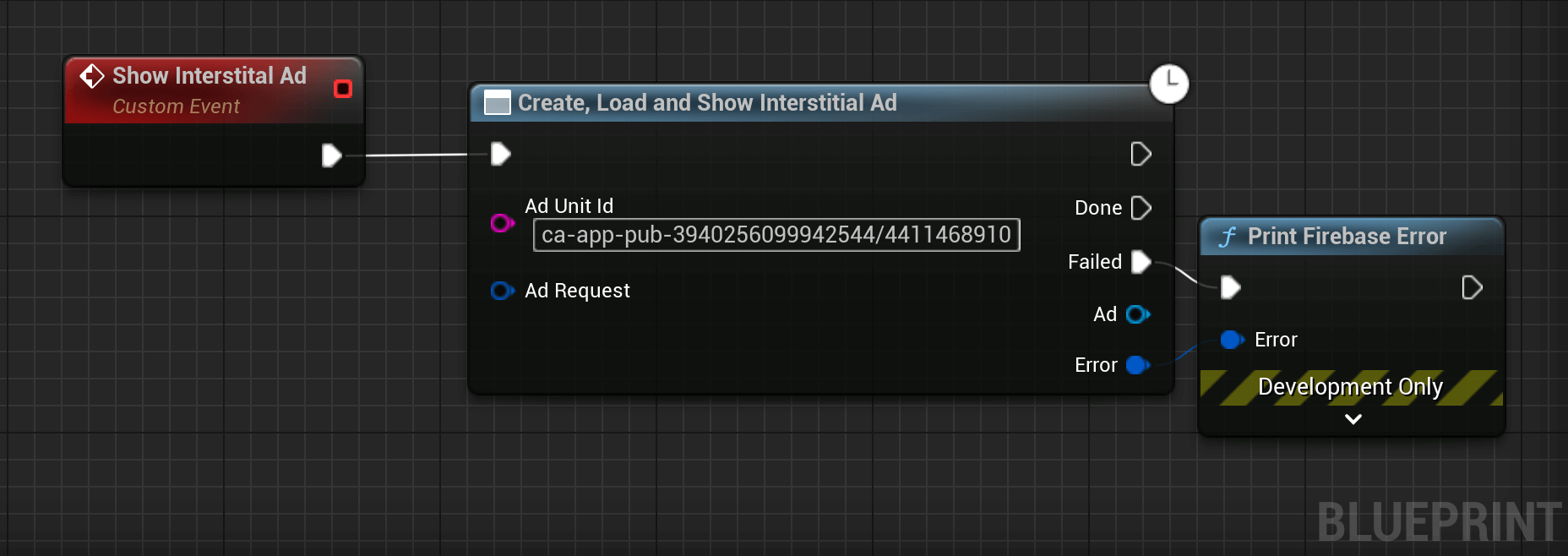
The following Blueprint code can be used to show an interstitial ad using a helper node:
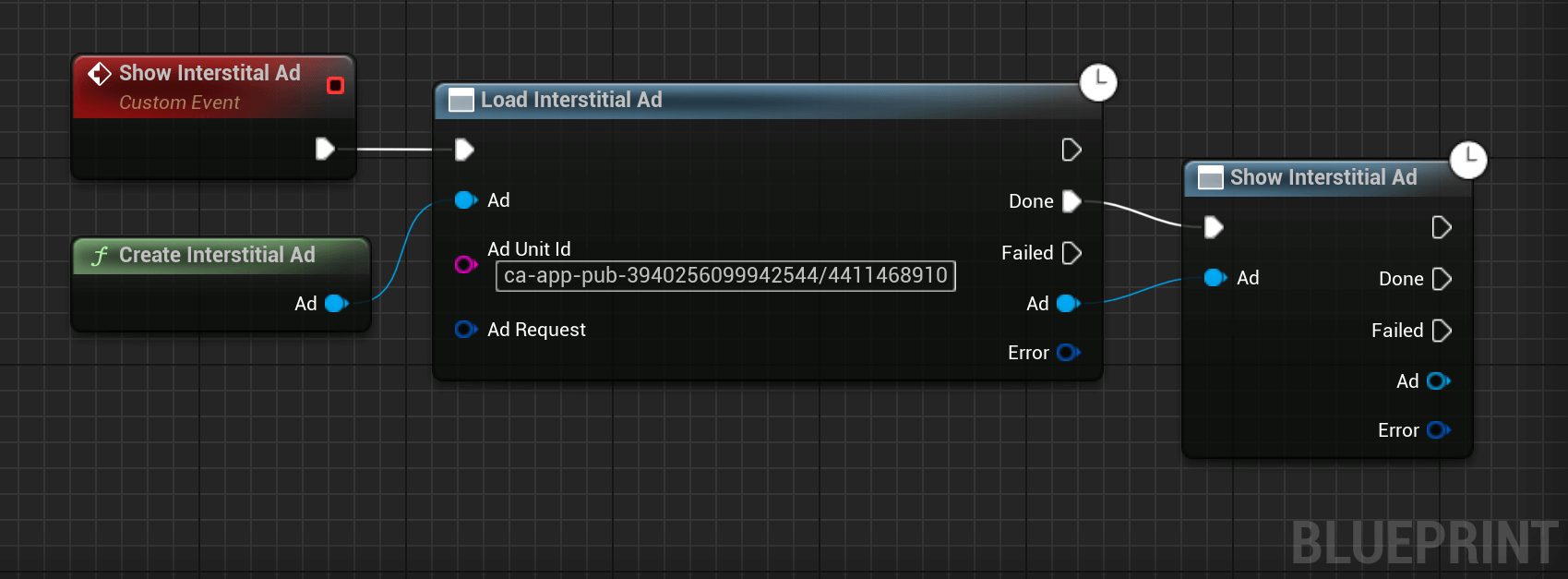
It is also possible to call each step separately, to preload ads for example:
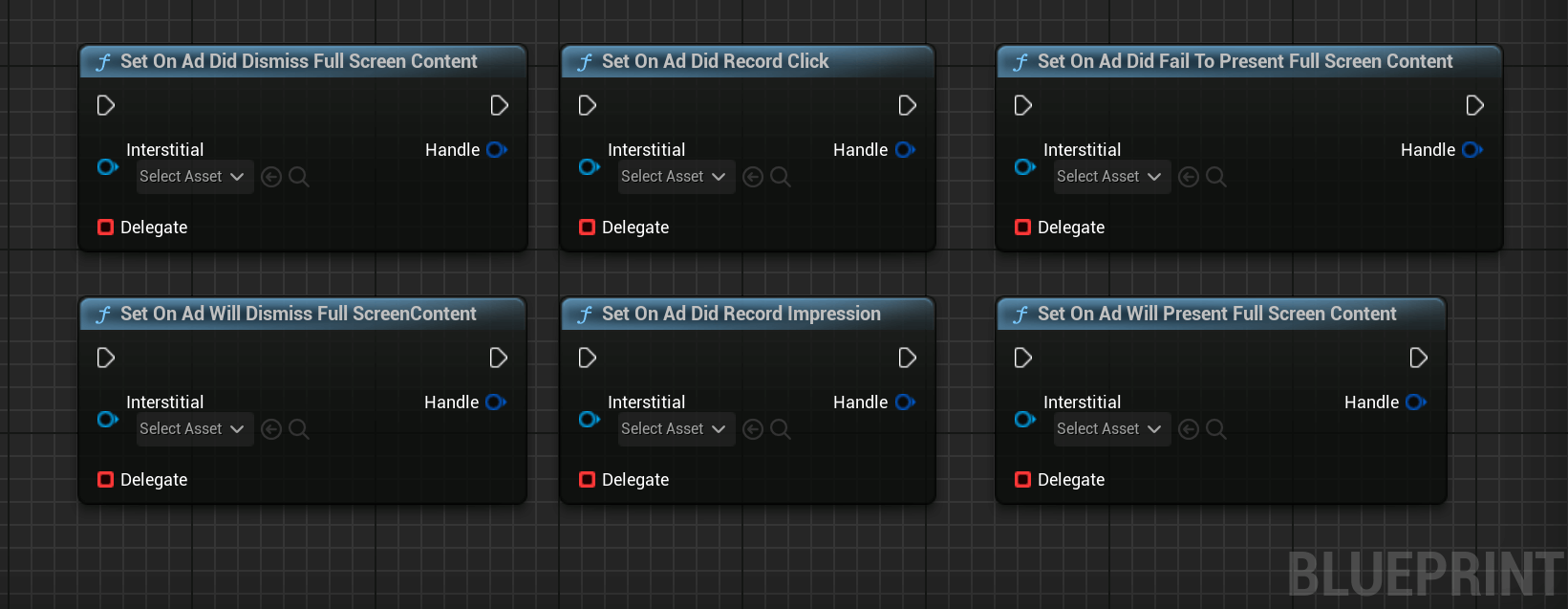
Multiple events are also available:
Rewarded Videos

Rewarded videos are ad formats that reward users for watching ads. They are great for monetising free-to-play users.
#include "AdMob/FbRewardedVideo.h"
/***********************************************
    Create a rewarded ad.
************************************************/
URewardedVideo* RewardedAd = NewObject<URewardedVideo>();
/***********************************************
    Handle the reward event.
************************************************/
RewardedAd->OnAdReward().AddLambda([](const FAdMobRewardItem& Reward)
{
    // This is where you grant the user their items/currency.
    UE_LOG(LogTemp, Log, TEXT("User rewarded: %f %s"), Reward.Amount, *Reward.Type);
});
/***********************************************
    Later, load the ad.
************************************************/
FAdMobAdRequest Request;
// Launch the load of the ad.
RewardedAd->LoadAd(
    /* Unique identifier for this rewarded slot. */
    TEXT("ca-app-pub-3940256099942544/5224354917"),
    /* Our request */
    Request,
    /* Server-side verification (optional) */
    {},
    /* Callback invoked once the ad is loaded or failed. */
    FFirebaseAdMobCallback::CreateLambda([](EAdMobError Error)
    {
        if (Error != EAdMobError::None)
        {
            // Failed to load the ad.
            UE_LOG(LogTemp, Error, TEXT("Failed to load rewarded ad (Error Code: %d)"), (int32)Error);
        }
        else
        {
            // Ad is loaded and ready to be shown.
        }
    }));
/***********************************************
    Finally, after the ad was loaded, show the ad.
************************************************/
/* Shows the rewarded ad */
RewardedAd->Show(FFirebaseAdMobCallback::CreateLambda([](EAdMobError Error)
{
    if (Error != EAdMobError::None)
    {
        // Failed to show the ad as something went wrong.
        UE_LOG(LogTemp, Error, TEXT("Failed to show rewarded ad: %d"), (int32)Error);
    }
    else
    {
        // Ad is currently covering the UI.
    }
}));
Here's how to show a Rewarded Video to your users:
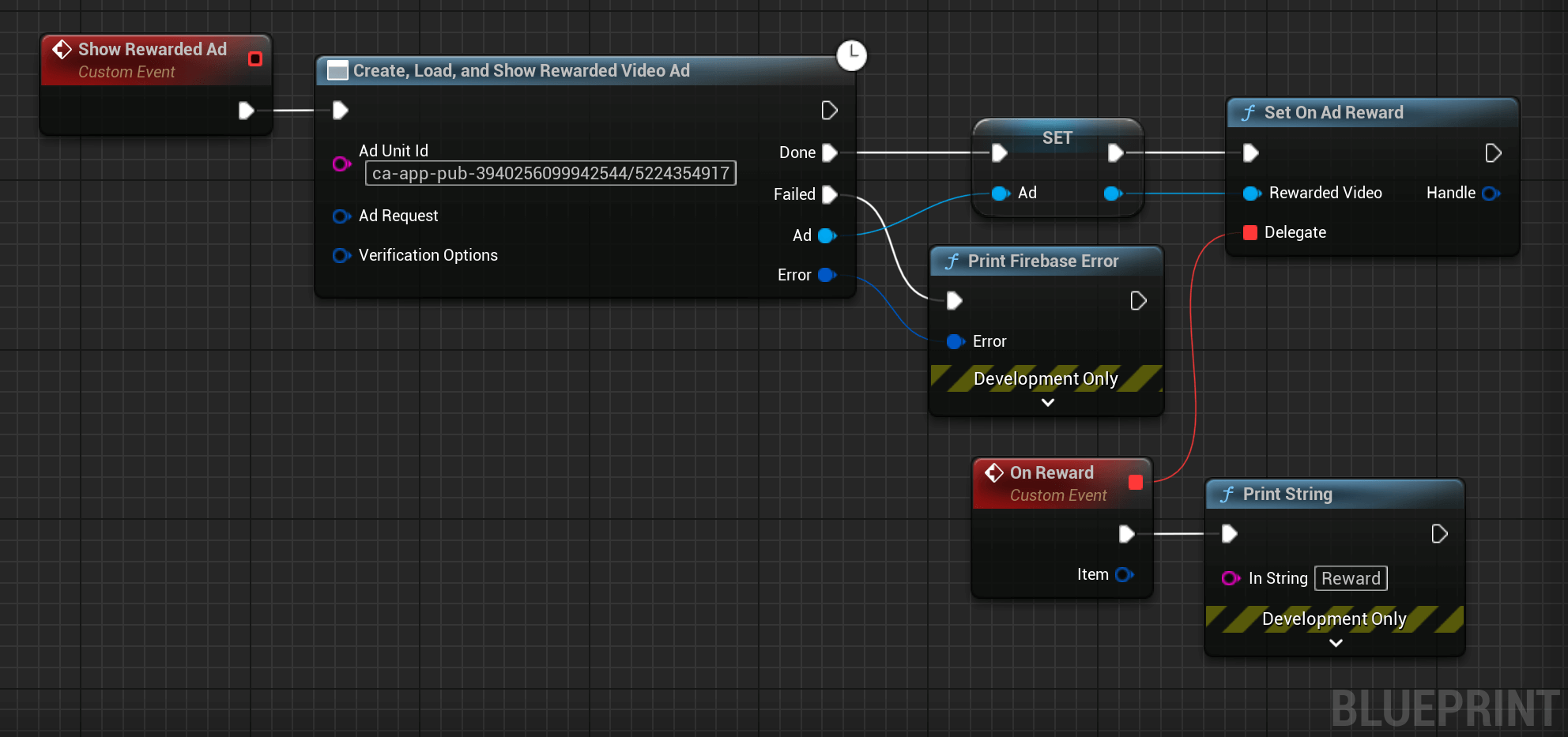
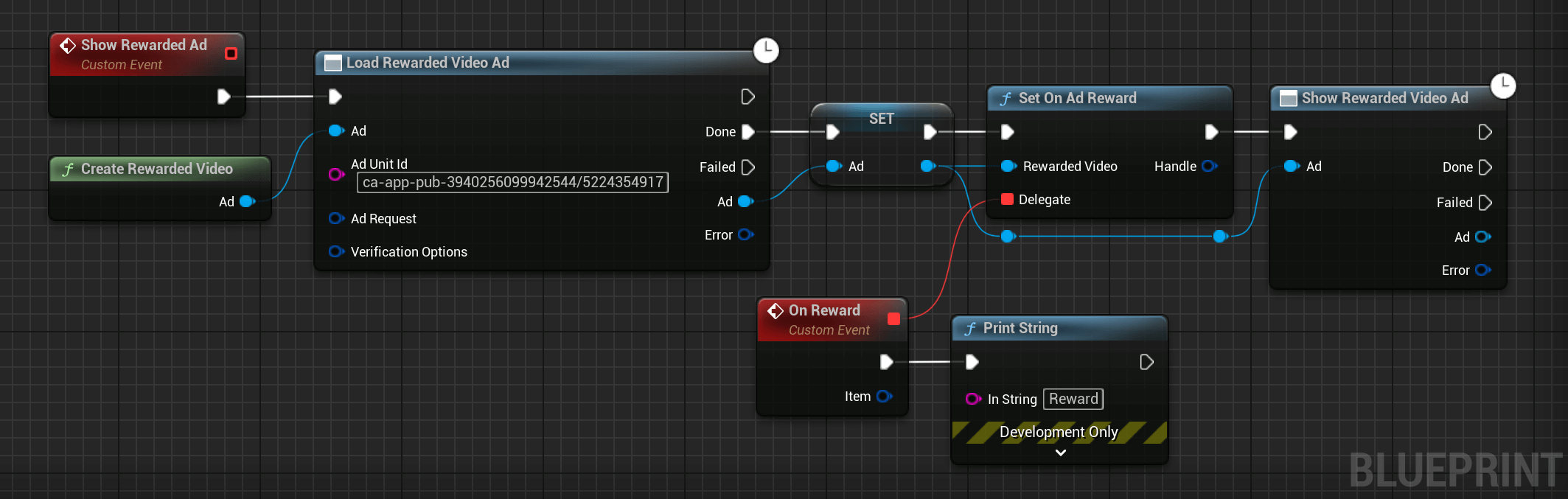
As Rewarded Videos take time to load, it is better to preload them before. The code can be modified to load an ad before showing it:
AppOuvrez Ads

App open ads are a special ad format intended for publishers wishing to monetize their app load screens. App open ads can be closed at any time et are designed to be shown when your users bring your app to the foreground.
// File containing the UAppOpenAd class.
#include "AdMob/FbAppOpenAd.h"
/***********************************************
    Create an ad.
************************************************/
UAppOpenAd* Ad = NewObject<UAppOpenAd>();
/***********************************************
    Later, load an ad.
************************************************/
// Create the ad request.
FAdMobAdRequest Request;
Request.Keywords = { TEXT("game"), TEXT("fun") };
// Launch the load of the ad.
Ad->Load(
   /* Ad Unit ID */
   TEXT("ca-app-pub-3940256099942544/5575463023"),
   /* Our request */
   Request,
   /* Callback when the ad is loaded. */
   FFirebaseAdMobCallback::CreateLambda([](FFirebaseError Error)
   {
      if (Error != EAdMobError::None)
      {
         // Failed to load the ad as something went wrong. Check the output log for the reason.
         UE_LOG(LogTemp, Error, TEXT("Failed to load an ad: %s"), *Error.Message);
      }
      else
      {
         // Ad is loaded and ready to be shown.
      }
   })
);
/***********************************************
    Finally, after the ad was loaded, show the ad.
************************************************/
/* Shows the ad */
Ad->Show(FFirebaseAdMobCallback::CreateLambda([](FFirebaseError Error)
{
   if (Error != EAdMobError::None)
   {
      // Failed to show the ad as something went wrong. Check the output log for reason.
      UE_LOG(LogTemp, Error, TEXT("Failed to show ad: %s"), *Error.Message);
   }
   else
   {
      // Ad is currently on screen.
   }
});
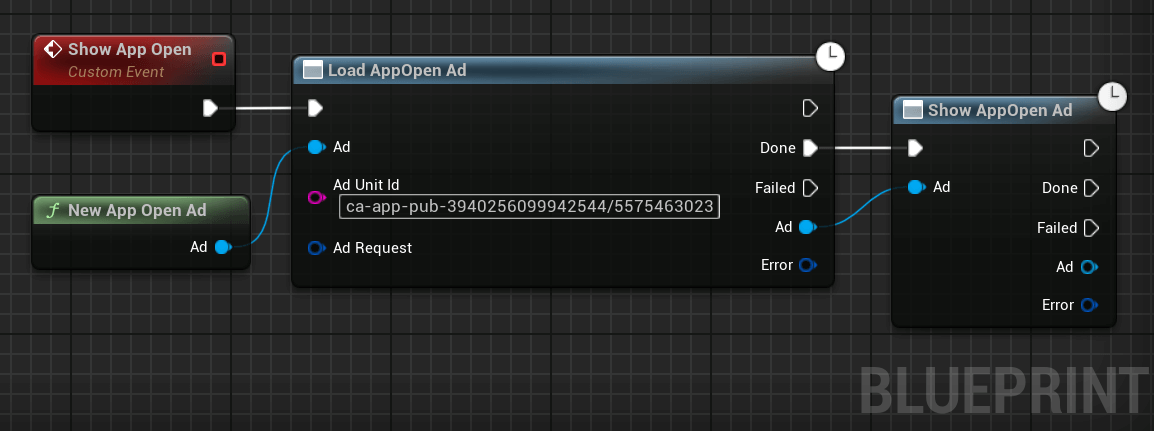
A helper method can be used to quickly implement AppOuvrez ads:
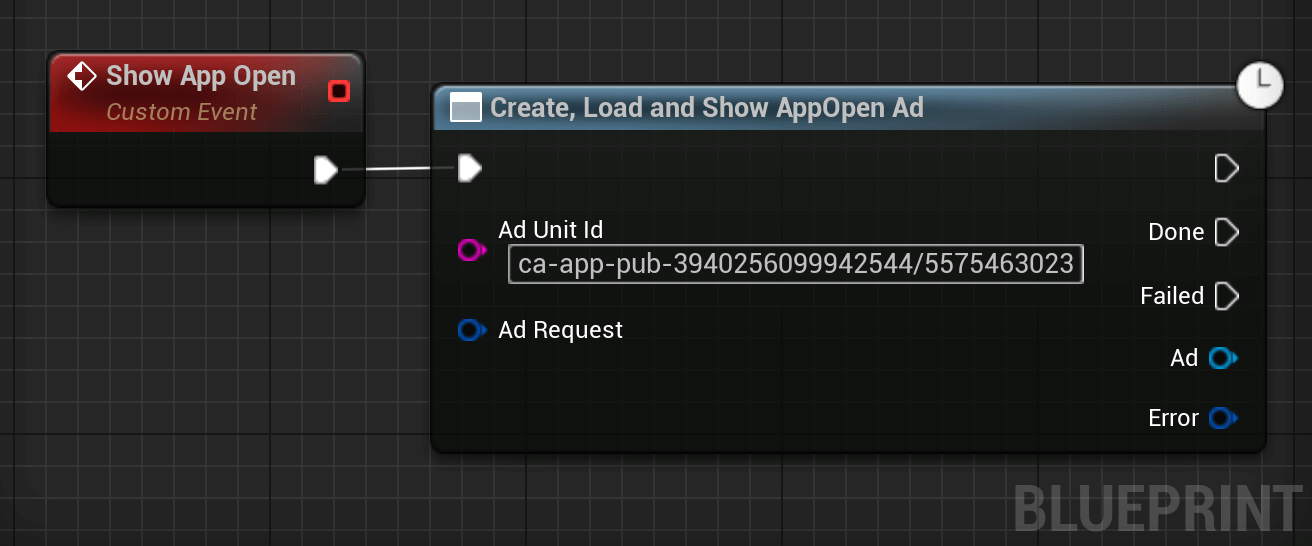
It is also possible to call the three functions separately: New App Open, Load Ad et Show Ad to be able to pre-load ads.