Realtime Database
The Firebase Realtime Database stores and synchronizes data using a NoSQL cloud database. Data is synchronized across all clients in realtime y remains available when your app goes offline.
Get Started with Firebase Realtime Database
Create a Database
Navigate to the Realtime Database section of the Firebase console. You'll be prompted to select an existing Firebase project. Follow the database creation workflow.
Select a starting mode for your Firebase Security Rules:
Test mode
Good for getting started with the mobile and web client libraries, but allows anyone to read and overwrite your data. After testing, make sure to review the Understand Firebase Realtime Database Rules section.Locked mode
Denies all reads and writes from mobile and web clients. Your authenticated application servers can still access your database.Choose a region for the database. Depending on your choice of region, the database namespace will be of the form
<databaseName>.firebaseio.comor<databaseName>.<region>.firebasedatabase.app. For more information, see select locations for your project.Haz clic en Done.
Setting up Restricted Access
If you do not want to use public access you can add Firebase Authentication to your app to control access to the database.
Saving Data with Firebase Realtime Database
Get a DatabaseReference
To write data to the Database, you need an instance of DatabaseReference:
#include "Database/Database.h"
#include "Database/DatabaseReference.h"
// 1. Get the Database instance (uses default URL from project settings)
UDatabase* Database = UDatabase::GetInstance();
// 2. Get a reference to the root of your database
UDatabaseReference* RootRef = Database->GetReference();
// 3. Get a reference to a specific path (e.g., "users/user_123")
UDatabaseReference* UserRef = Database->GetReferenceFromPath(TEXT("users/user_123"));
// 4. Alternatively, use a child path from an existing reference
UDatabaseReference* ScoreRef = UserRef->Child(TEXT("stats/high_score"));
// 5. You can also get a reference directly from a full URL
UDatabaseReference* UrlRef = Database->GetReferenceFromUrl(TEXT("https://your-db.firebaseio.com/global_config"));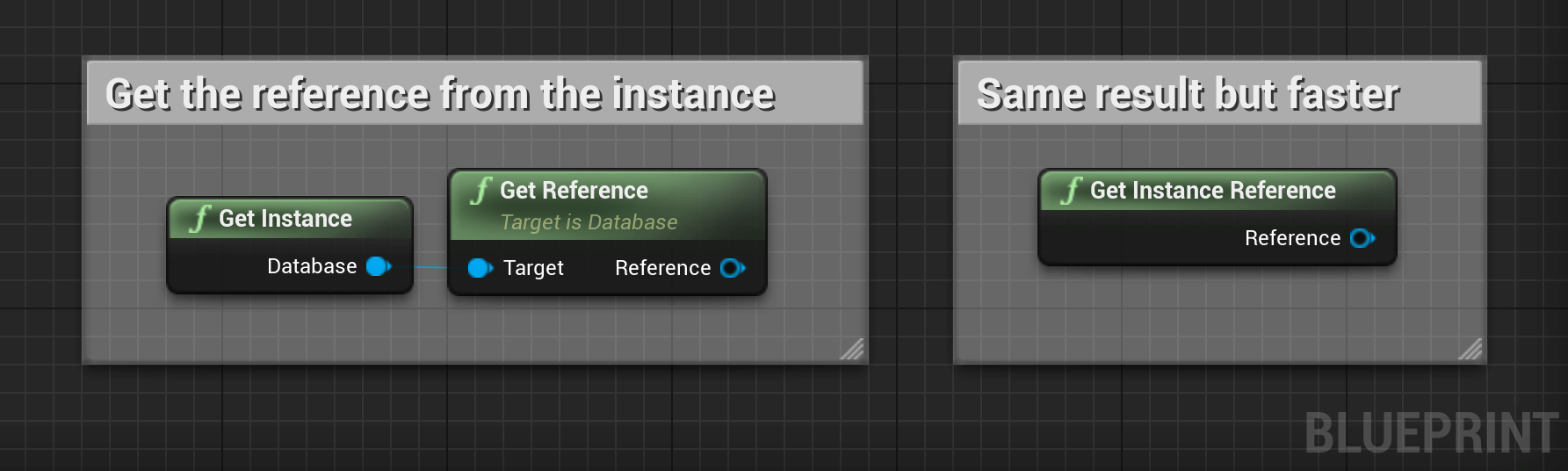
Saving Data
There are four methods for writing data to the Firebase Realtime Database:
| Method | Common uses |
|---|---|
SetValue() |
Write or replace data to a defined path, such as users/<user-id>/<username>. |
PushChild() |
Add to a list of data. Every time you call Push(), Firebase generates a unique key that can also be used as a unique identifier, such as user-scores/<user-id>/<unique-score-id>. |
UpdateChildren() |
Update some of the keys for a defined path without replacing all of the data. |
RunTransaction() |
Update complex data that could be corrupted by concurrent updates. |
Write, Update, or Delete Data at a Reference
Basic Write Operations
For basic write operations, you can use the SetValue() method to save data to a specified reference, replacing any existing data at that path:
Using SetValue() in this way overwrites data at the specified location, including any child nodes.
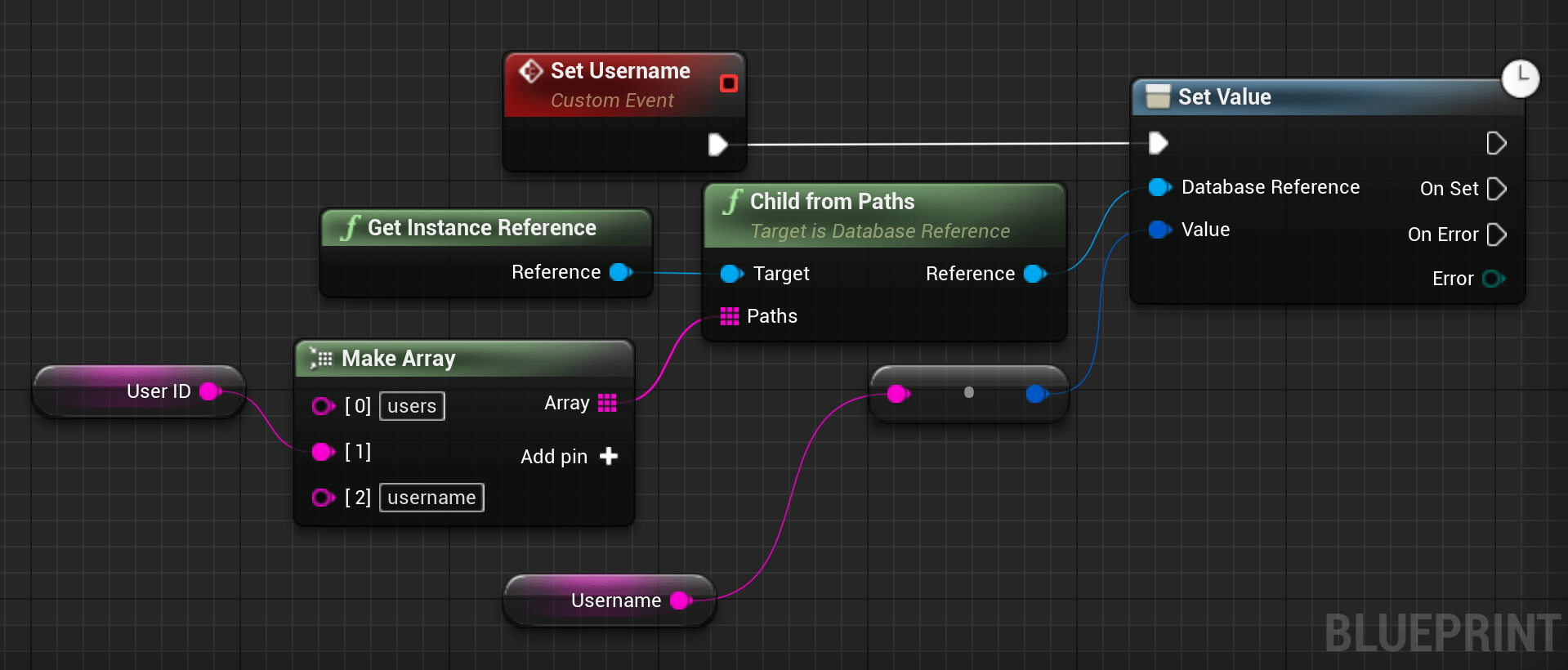
However, you can still update a child without rewriting the entire object. If you want to allow users to update their profiles you
could update the username as follows:
#include "Database/Database.h"
#include "Database/DatabaseReference.h"
// 1. Get a reference to the user's profile
UDatabaseReference* UserRef = UDatabase::GetInstanceReference()->Child(TEXT("users/user_123"));
// 2. Perform a basic write to overwrite the entire node
// Using FFirebaseVariant to wrap the data (String, Int64, Double, or Bool)
UserRef->SetValue(FFirebaseVariant(TEXT("New Profile Data")), FDatabaseCallback::CreateLambda([](const EFirebaseDatabaseError Error)
{
    if (Error == EFirebaseDatabaseError::None)
    {
        UE_LOG(LogTemp, Log, TEXT("Value set successfully!"));
    }
}));
// 3. Update only a specific child without overwriting the parent
// This specifically updates "users/user_123/username"
UserRef->Child(TEXT("username"))->SetValue(FFirebaseVariant(TEXT("JohnDoe")), FDatabaseCallback::CreateLambda([](const EFirebaseDatabaseError Error)
{
    if (Error == EFirebaseDatabaseError::None)
    {
        UE_LOG(LogTemp, Log, TEXT("Username updated successfully!"));
    }
}));
Append to a list of data
Use the PushChild() method to append data to a list in multiuser applications. The PushChild() method generates a unique key every
time a new child is added to the specified Firebase reference. By using these auto-generated keys for each new element in the list,
several clients can add children to the same location at the same time without write conflicts. The unique key generated by PushChild()
is based on a timestamp, so list items are automatically ordered chronologically.
You can use the reference to the new data returned by the PushChild() method to get the value of the child's auto-generated key or
set data for the child. Calling GetKey() on a PushChild() reference returns the value of the auto-generated key.
Delete data
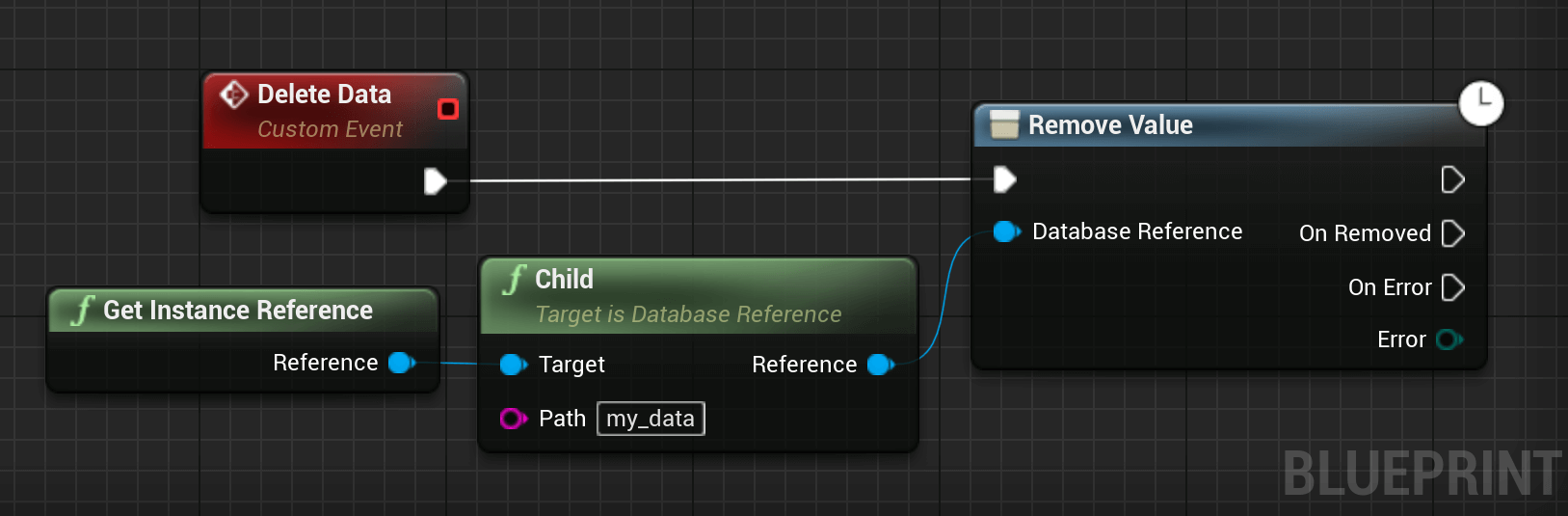
The simplest way to delete data is to call RemoveValue() on a reference to the location of that data.
#include "Database/Database.h"
#include "Database/DatabaseReference.h"
// 1. Get a reference to the specific node you want to delete.
UDatabaseReference* DataRef = UDatabase::GetInstanceReference()->Child(TEXT("users/user_123/old_data"));
// 2. Call RemoveValue to delete the data at this location and all its children.
DataRef->RemoveValue(FDatabaseCallback::CreateLambda([](const EFirebaseDatabaseError Error)
{
    if (Error == EFirebaseDatabaseError::None)
    {
        UE_LOG(LogTemp, Log, TEXT("Data removed successfully."));
    }
    else
    {
        UE_LOG(LogTemp, Error, TEXT("Failed to remove data. Error Code: %d"), (int32)Error);
    }
}));
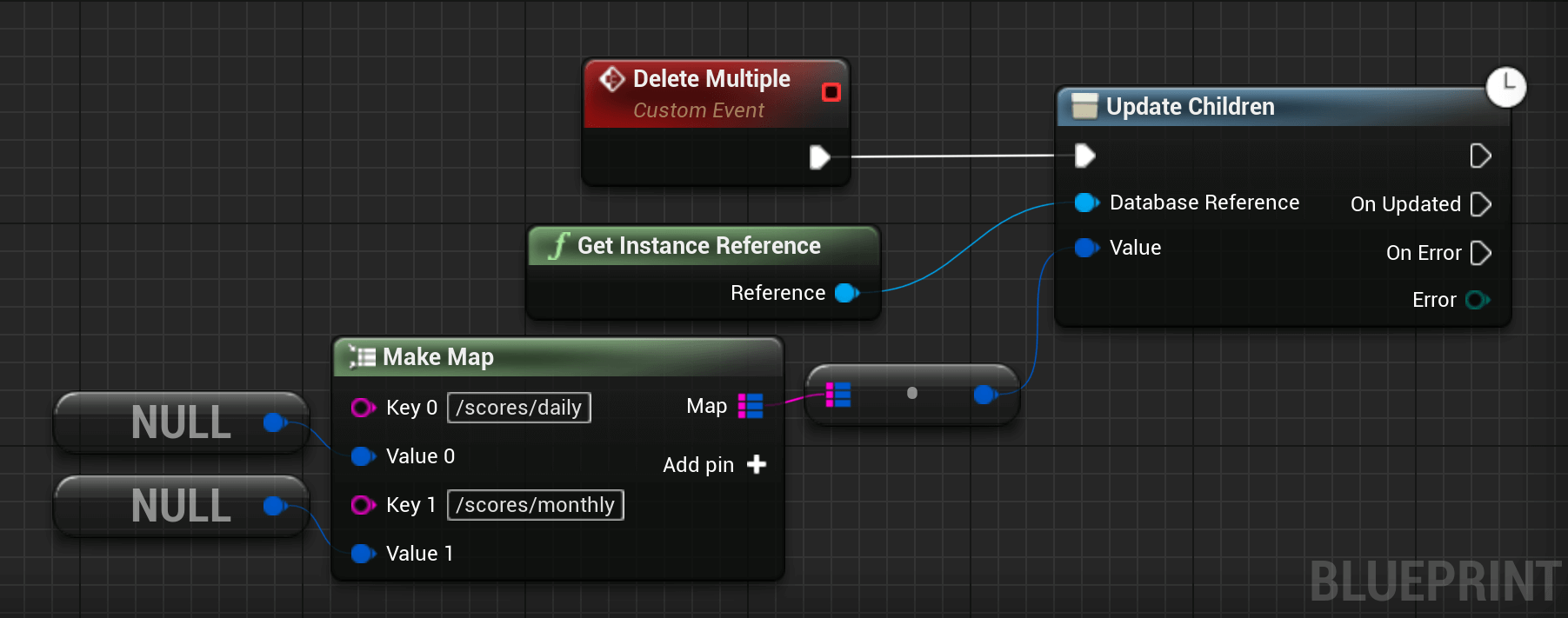
You can also delete by specifying a null Variant as the value for another write operation such as SetValue() or UpdateChildren().
You can use this technique with UpdateChildren() to delete multiple children in a single API call.
#include "Database/Database.h"
#include "Database/DatabaseReference.h"
#include "FirebaseSdk/FirebaseVariant.h"
// 1. Get a reference to a user's node
UDatabaseReference* UserRef = UDatabase::GetInstanceReference()->Child(TEXT("users/user_123"));
// 2. Prepare a Map Variant containing the updates.
// A null Variant acts as a deletion instruction for that specific path.
TMap<FString, FFirebaseVariant> Updates;
Updates.Add(TEXT("profile/bio"), FFirebaseVariant(TEXT("New Bio Content"))); // Update/Set
Updates.Add(TEXT("temporary_token"), FFirebaseVariant());                    // Delete (Null Variant)
Updates.Add(TEXT("old_settings/theme"), FFirebaseVariant());                 // Delete (Null Variant)
// 3. Apply the updates atomically using a Map Variant
// This will update the bio and delete both the token and the theme in one call.
UserRef->UpdateChildren(FFirebaseVariant(Updates), FDatabaseCallback::CreateLambda([](const EFirebaseDatabaseError Error)
{
    if (Error == EFirebaseDatabaseError::None)
    {
        UE_LOG(LogTemp, Log, TEXT("Multiple deletions and updates processed successfully."));
    }
    else
    {
        UE_LOG(LogTemp, Error, TEXT("UpdateChildren failed. Error Code: %d"), (int32)Error);
    }
}));
Write data offline
If a client loses its network connection, your app will continue functioning correctly.
Every client connected to a Firebase database maintains its own internal version of any active data. When data is written, it's written to this local version first. The Firebase client then synchronizes that data with the remote database servers and with other clients on a "best-effort" basis.
As a result, all writes to the database trigger local events immediately, before any data is written to the server. This means your app remains responsive regardless of network latency or connectivity.
Once connectivity is reestablished, your app receives the appropriate set of events so that the client syncs with the current server state, without having to write any custom code.
Configuración Disconnection Handler
Operations can be setup on the Database when a user disconnects.
#include "Database/Database.h"
#include "Database/DatabaseReference.h"
#include "FirebaseSdk/FirebaseVariant.h"
// 1. Get a reference to the user's presence node.
UDatabaseReference* PresenceRef = UDatabase::GetInstanceReference()->Child(TEXT("users/user_123/online"));
// 2. Obtain the disconnection handler for this specific reference.
UDisconnectionHandler* Handler = PresenceRef->OnDisconnect();
// 3. Queue an operation to be performed by the server when the client disconnects.
// In this case, we set the 'online' status to false.
Handler->SetValue(FFirebaseVariant(false), FDatabaseCallback::CreateLambda([](const EFirebaseDatabaseError Error)
{
    if (Error == EFirebaseDatabaseError::None)
    {
        UE_LOG(LogTemp, Log, TEXT("Disconnection operation successfully queued on the server."));
    }
    else
    {
        UE_LOG(LogTemp, Error, TEXT("Failed to queue disconnection operation. Error Code: %d"), (int32)Error);
    }
}));
// 4. You can also update multiple fields upon disconnection.
TMap<FString, FFirebaseVariant> DisconnectUpdates;
DisconnectUpdates.Add(TEXT("last_seen"), FFirebaseVariant(ServerValue::Timestamp()));
DisconnectUpdates.Add(TEXT("status"), FFirebaseVariant(TEXT("offline")));
PresenceRef->GetParent()->OnDisconnect()->UpdateChildren(FFirebaseVariant(DisconnectUpdates), FDatabaseCallback());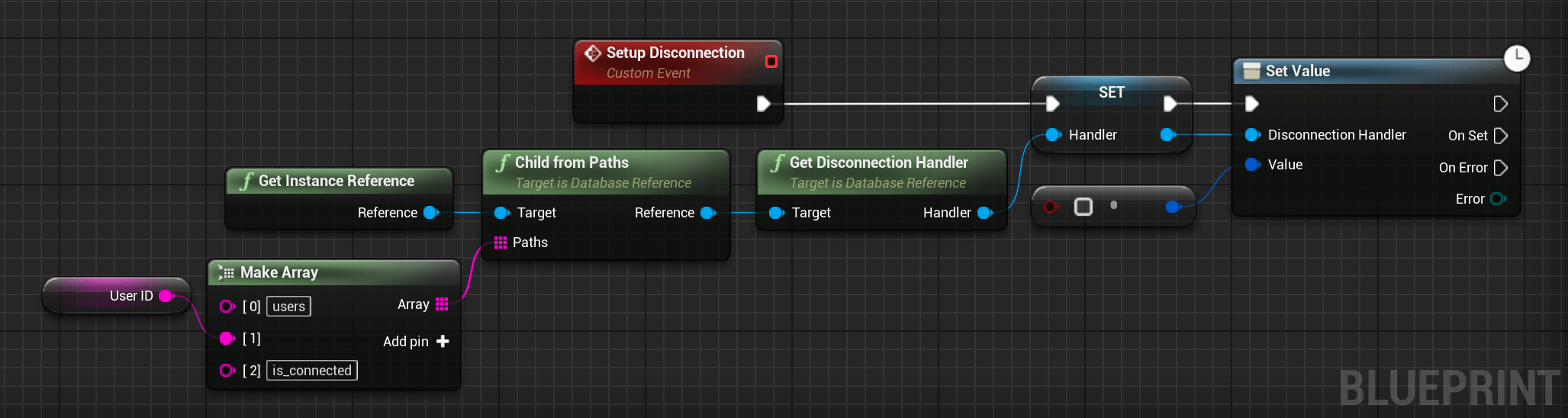
The following operations are available:
- Remove Value
- Set Value
- Set Value and Priority
- Update Children
Retrieving Data with Firebase Realtime Database
Read Data Once
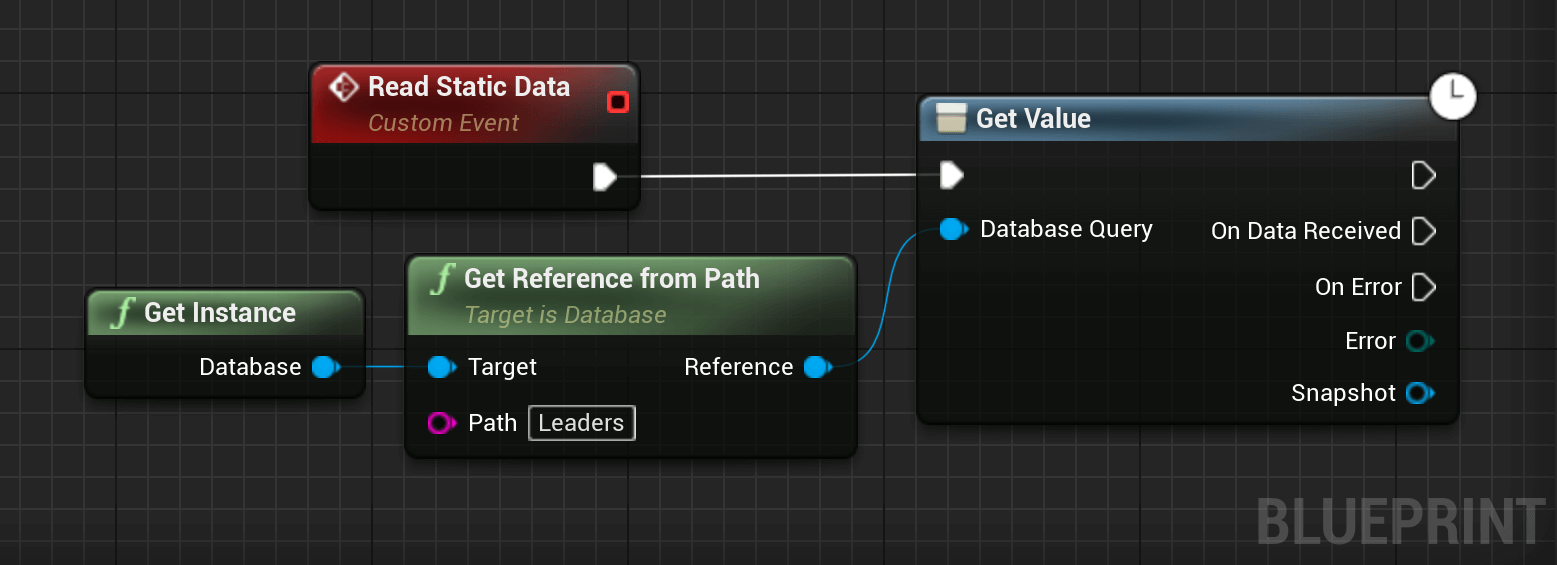
You can use the GetValue() method to read a static snapshot of the contents at a given path once. The task result will
contain a snapshot containing all data at that location, including child data. If there is no data, the snapshot returned is null.
#include "Database/Database.h"
#include "Database/DatabaseReference.h"
#include "Database/DataSnapshot.h"
// 1. Get a reference to the data you want to read.
UDatabaseReference* DataRef = UDatabase::GetInstanceReference()->Child(TEXT("scores/global_leaderboard"));
// 2. Request the data snapshot once.
DataRef->GetValue(FSnapshotCallback::CreateLambda([](const EFirebaseDatabaseError Error, UDataSnapshot* const Snapshot)
{
    if (Error == EFirebaseDatabaseError::None && Snapshot && Snapshot->Exists())
    {
        // 3. Process the data from the snapshot.
        FFirebaseVariant Value = Snapshot->GetValue();

        if (Value.IsMap())
        {
            UE_LOG(LogTemp, Log, TEXT("Retrieved leaderboard with %lld children."), Snapshot->ChildrenCount());
        }
        else
        {
            UE_LOG(LogTemp, Log, TEXT("Retrieved value: %s"), *Value.AsString());
        }
    }
    else if (Error != EFirebaseDatabaseError::None)
    {
        UE_LOG(LogTemp, Error, TEXT("Failed to read data. Error Code: %d"), (int32)Error);
    }
    else
    {
        UE_LOG(LogTemp, Warning, TEXT("No data found at this location."));
    }
}));
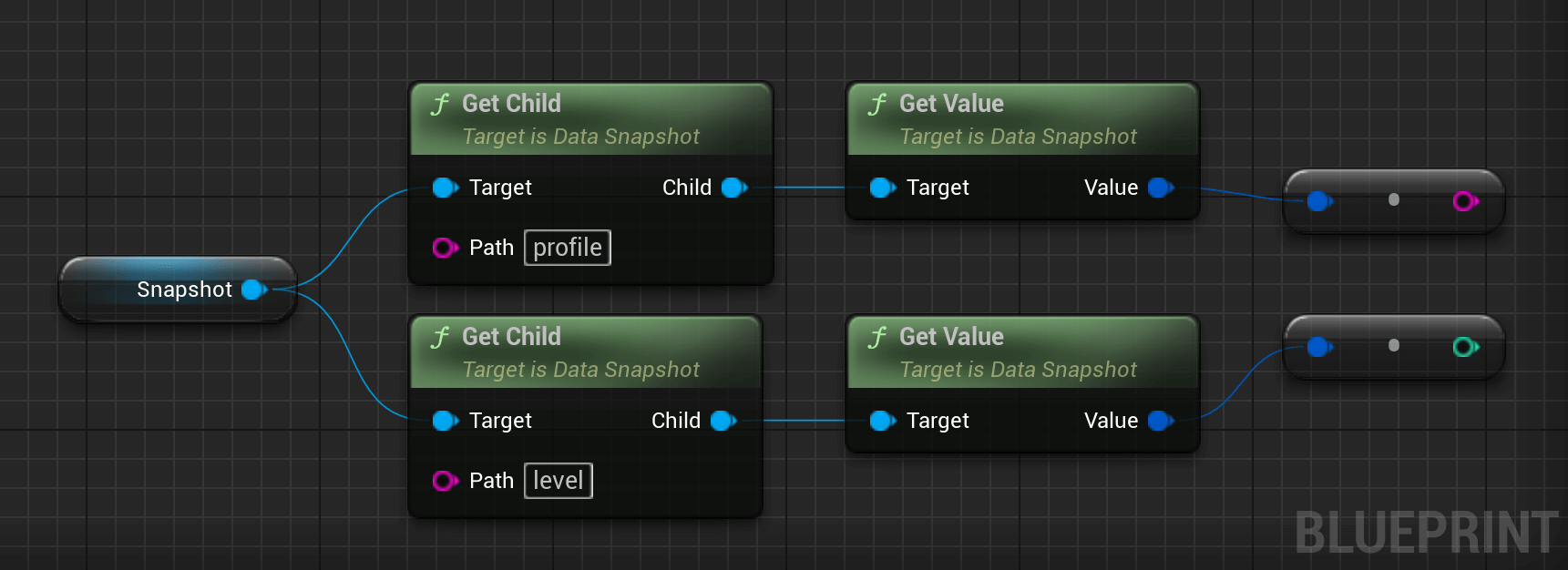
The data from the snapshot can then be read as followed when we get a node with children:
#include "Database/Database.h"
#include "Database/DatabaseReference.h"
#include "FirebaseSdk/FirebaseVariant.h"
// ... inside the FSnapshotCallback Lambda ...
if (Error == EFirebaseDatabaseError::None && Snapshot && Snapshot->Exists())
{
    // 1. Check if the snapshot has children before iterating.
    if (Snapshot->HasChildren())
    {
        // 2. Retrieve all immediate children as an array of snapshots.
        TArray<UDataSnapshot*> LeaderboardEntries = Snapshot->GetChildren();
        for (UDataSnapshot* Entry : LeaderboardEntries)
        {
            // 3. Each child snapshot represents a single node (e.g., a User ID).
            FString UserID = Entry->GetKey();
            FFirebaseVariant UserData = Entry->GetValue();
            // 4. Access specific nested fields within this child entry.
            if (Entry->HasChild(TEXT("score")))
            {
                int64 Score = Entry->GetChild(TEXT("score"))->GetValue().AsInt64();
                UE_LOG(LogTemp, Log, TEXT("User: %s | Score: %lld"), *UserID, Score);
            }
        }
    }
    else
    {
        // If it exists but has no children, it's a leaf node.
        UE_LOG(LogTemp, Log, TEXT("Value: %s"), *Snapshot->GetValue().AsString());
    }
}
Listen for Events
Available Events
Several events are available on a reference to handle data or structure changes:
| Event Name | Details |
|---|---|
OnChildAdded |
Called when a child has been added to the reference watched. |
OnChildChanged |
Called when a child of the reference we watch has been modified. |
OnChildMoved |
Called when a child of the reference we watch has been moved. |
OnChildRemoved |
Called when a child of the reference we watch has been removed. |
OnCancelled |
Called when the watch has been cancelled. |
OnValueChanged |
Called when the value watched has changed. |
Value Listener
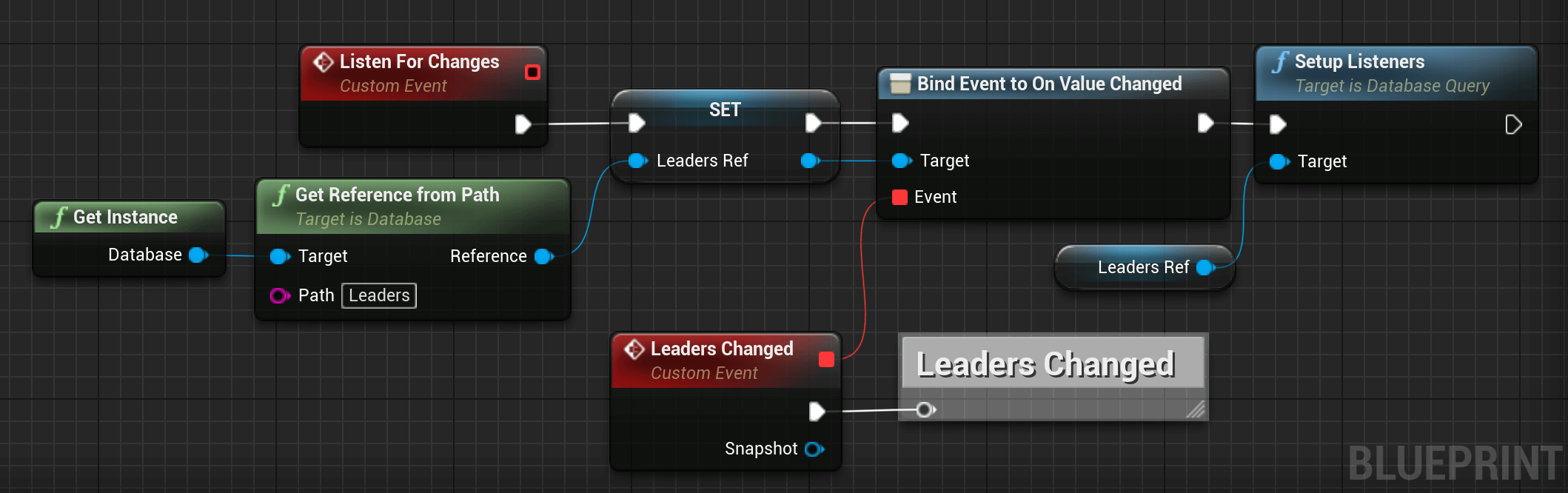
You can use the OnValueChanged callbacks to subscribe to changes to the contents at a given path. This callback is triggered once
when the listener is attached and again every time the data, including children, changes. The callback is passed a snapshot containing
all data at that location, including child data. If there is no data, the snapshot returned is null.
Important: The OnValueChanged event is called every time data is changed at the specified database reference,
including changes to children. To limit the size of your snapshots, attach only at the highest level needed for watching changes.
For example, attaching a listener to the root of your database is not recommended.
The following example demonstrates a game retrieving the scores of a leaderboard from the database when it changed:
#include "Database/Database.h"
#include "Database/DatabaseReference.h"
#include "FirebaseSdk/FirebaseVariant.h"
// 1. Get a reference to the leaderboard.
UDatabaseReference* LeaderboardRef = UDatabase::GetInstanceReference()->Child(TEXT("scores/global_leaderboard"));
// 2. Bind the OnValueChanged dynamic multicast delegate.
// Note: The function must be a UFUNCTION() to be bound to a dynamic delegate.
LeaderboardRef->OnValueChanged.AddDynamic(this, &AYourActor::OnLeaderboardUpdated);
// 3. Initialize the listener. Without this call, events will not trigger.
LeaderboardRef->ConfiguraciónListeners();
// --- Implementation of the bound function ---
void AYourActor::OnLeaderboardUpdated(UDataSnapshot* Snapshot)
{
    // This will fire immediately upon ConfiguraciónListeners() and every time data changes thereafter.
    if (Snapshot && Snapshot->Exists())
    {
        UE_LOG(LogTemp, Log, TEXT("Leaderboard updated! Processing %lld entries..."), Snapshot->ChildrenCount());
        TArray<UDataSnapshot*> Entries = Snapshot->GetChildren();
        for (UDataSnapshot* Entry : Entries)
        {
            FString UserName = Entry->GetKey();
            int64 Score = Entry->GetChild(TEXT("score"))->GetValue().AsInt64();

            UE_LOG(LogTemp, Log, TEXT("User: %s - Score: %lld"), *UserName, Score);
        }
    }
}
Sorting and Filtering Data
You can use the Realtime Database Query class to retrieve data sorted by key, by value, or by value of a child. You can also filter the sorted result to a specific number of results or a range of keys or values.
Note: Filtering and sorting can be expensive, especially when done on the client. If your app uses queries,
define the .indexOn rule to index those keys on the server and improve query performance as described in Indexing Your Data.
Sort Data
To retrieve sorted data, start by specifying one of the order-by methods to determine how results are ordered:
| Method | Usage |
|---|---|
OrderByChild() |
Order results by the value of a specified child key. |
OrderByKey() |
Order results by child keys. |
OrderByValue() |
Order results by child values. |
You can only use one order-by method at a time. Calling an order-by method multiple times in the same query throws an error.
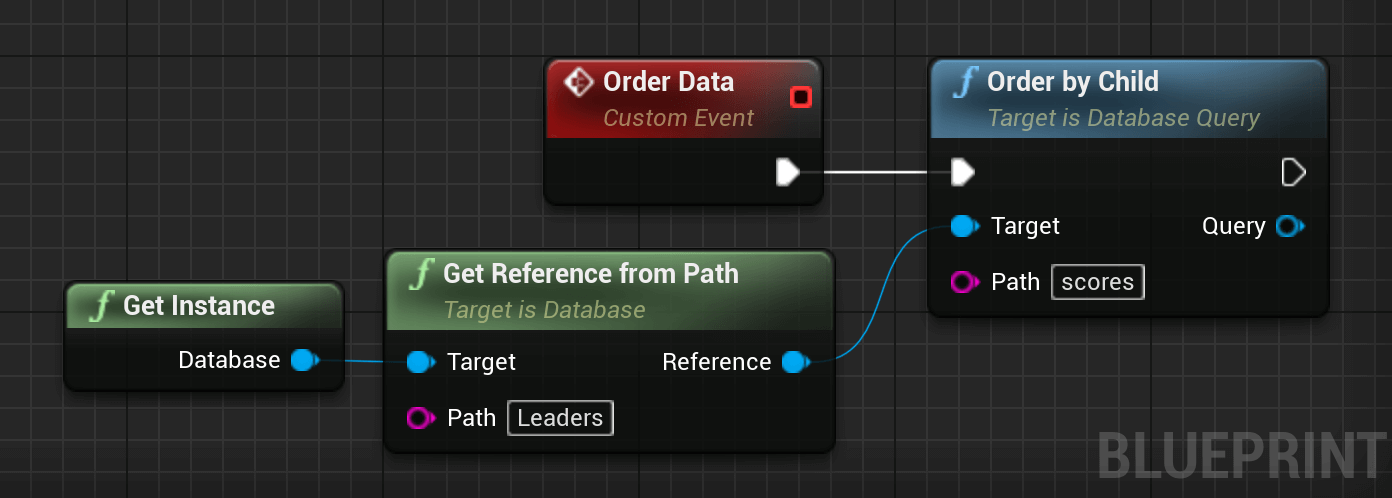
The following example demonstrates how you could subscribe to a score leaderboard ordered by score.
#include "Database/Database.h"
#include "Database/DatabaseReference.h"
#include "FirebaseSdk/FirebaseVariant.h"
// 1. Get a reference to the scores node.
UDatabaseReference* ScoresRef = UDatabase::GetInstanceReference()->Child(TEXT("scores"));
// 2. Create a Query by ordering by the "score" child key.
// OrderByChild returns a UDatabaseQuery*.
UDatabaseQuery* SortedQuery = ScoresRef->OrderByChild(TEXT("score"));
// 3. Bind the OnValueChanged event to the sorted query.
// This will return the children in ascending order of their "score" value.
SortedQuery->OnValueChanged.AddDynamic(this, &AYourActor::OnSortedScoresReceived);
// 4. Initialize the listener on the query.
SortedQuery->ConfiguraciónListeners();
// --- Implementation ---
void AYourActor::OnSortedScoresReceived(UDataSnapshot* Snapshot)
{
    if (Snapshot && Snapshot->Exists())
    {
        // When iterating through Snapshot->GetChildren(),
        // the array will respect the sort order defined in the query.
        TArray<UDataSnapshot*> SortedEntries = Snapshot->GetChildren();
        for (UDataSnapshot* Entry : SortedEntries)
        {
            FString User = Entry->GetKey();
            int64 Val = Entry->GetChild(TEXT("score"))->GetValue().AsInt64();

            UE_LOG(LogTemp, Log, TEXT("Ranked User: %s | Score: %lld"), *User, Val);
        }
    }
}
Filtering Data
To filter data, you can combine any of the limit or range methods with an order-by method when constructing a query.
| Method | Usage |
|---|---|
LimitToFirst() |
Sets the maximum number of items to return from the beginning of the ordered list of results. |
LimitToLast() |
Sets the maximum number of items to return from the end of the ordered list of results. |
StartAt() |
Return items greater than or equal to the specified key or value depending on the order-by method chosen. |
EndAt() |
Return items less than or equal to the specified key or value depending on the order-by method chosen. |
EqualTo() |
Return items equal to the specified key or value depending on the order-by method chosen. |
Unlike the order-by methods, you can combine multiple limit or range functions. For example, you can combine the StartAt()
and EndAt() methods to limit the results to a specified range of values.
Even when there is only a single match for the query, the snapshot is still a list; it just contains a single item.
Limit the Number of Results
You can use the LimitToFirst() and LimitToLast() methods to set a maximum number of children to be synced for a given callback.
For example, if you use LimitToFirst() to set a limit of 100, you initially only receive up to 100 OnChildAdded callbacks.
If you have fewer than 100 items stored in your Firebase database, an OnChildAdded callback fires for each item.
As items change, you receive OnChildAdded callbacks for items that enter the query and OnChildRemoved callbacks for items that drop
out of it so that the total number stays at 100.
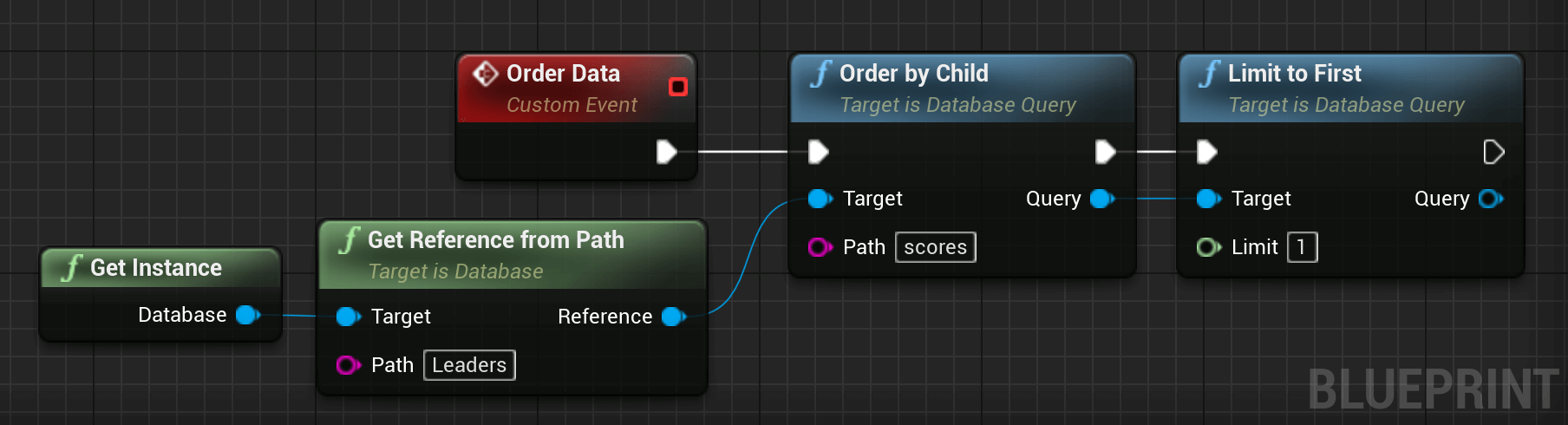
For example, the code below returns the top score from a leaderboard:
#include "Database/Database.h"
#include "Database/DatabaseReference.h"
#include "FirebaseSdk/FirebaseVariant.h"
// 1. Get a reference to the scores.
UDatabaseReference* ScoresRef = UDatabase::GetInstanceReference()->Child(TEXT("scores"));
// 2. Chain order and limit methods.
// OrderByChild orders ascending; LimitToLast(1) picks the highest value.
UDatabaseQuery* TopScoreQuery = ScoresRef->OrderByChild(TEXT("score"))->LimitToLast(1);
// 3. Bind the OnValueChanged event.
TopScoreQuery->OnValueChanged.AddDynamic(this, &AYourActor::OnTopScoreReceived);
// 4. Initialize the listener.
TopScoreQuery->ConfiguraciónListeners();
// --- Implementation ---
void AYourActor::OnTopScoreReceived(UDataSnapshot* Snapshot)
{
    if (Snapshot && Snapshot->Exists() && Snapshot->HasChildren())
    {
        // Even with a limit of 1, the result is returned as a parent snapshot
        // containing the matching child.
        TArray<UDataSnapshot*> Children = Snapshot->GetChildren();
        UDataSnapshot* TopEntry = Children[0];
        FString PlayerName = TopEntry->GetKey();
        int64 Score = TopEntry->GetChild(TEXT("score"))->GetValue().AsInt64();
        UE_LOG(LogTemp, Log, TEXT("Current Top Player: %s with %lld points!"), *PlayerName, Score);
    }
}
Filter by key or value
You can use StartAt(), EndAt() y EqualTo() to choose arbitrary starting, ending y equivalence points for queries. This can be useful for paginating data or finding items with children that have a specific value.
How query data is ordered
This section explains how data is sorted by each of the order-by methods in the Query class.
OrderByChild
When using OrderByChild(), data that contains the specified child key is ordered as follows:
- Children with a
nullvalue for the specified child key come first. - Children with a value of
falsefor the specified child key come next. If multiple children have a value offalse, they are sorted lexicographically by key. - Children with a value of
truefor the specified child key come next. If multiple children have a value oftrue, they are sorted lexicographically by key. - Children with a numeric value come next, sorted in ascending order. If multiple children have the same numerical value for the specified child node, they are sorted by key.
- Strings come after numbers and are sorted lexicographically in ascending order. If multiple children have the same value for the specified child node, they are ordered lexicographically by key.
- Objects come last and are sorted lexicographically by key in ascending order.
OrderByKey
When using OrderByKey() to sort your data, data is returned in ascending order by key.
- Children with a key that can be parsed as a 32-bit integer come first, sorted in ascending order.
- Children with a string value as their key come next, sorted lexicographically in ascending order.
OrderByValue
When using OrderByValue(), children are ordered by their value. The ordering criteria are the same as in OrderByChild(),
except the value of the node is used instead of the value of a specified child key.