AdMob
Esta sección explica cómo usar AdMob con el plugin Firebase Features.
AdMob te ayuda a monetizar tu aplicación móvil mediante publicidad integrada. Hay tres tipos de anuncios disponibles.
Para el desarrollo, deberías elegir un ID de unidad de anuncios de prueba o tu cuenta de AdMob podría ser penalizada.
Banner View

Los banners son anuncios rectangulares que ocupan una parte del diseño de la aplicación. Pueden actualizarse automáticamente tras un periodo de tiempo.
#include "AdMob/FbBannerView.h"
/***********************************************
    Create a banner.
************************************************/
UBannerView* Banner = NewObject<UBannerView>();
/***********************************************
    Later, initialize the banner.
************************************************/
FAdMobAdSize Size;
Size.bAdaptive = true;
// Launch the initialization of the banner.
Banner->Initialize(
    /* The physical dimensions. */
    Size,
    /* The screen position. */
    EAdMobBannerViewPosition::Bottom,
    /* Offsets to avoid system UI overlays. */
    true,
    /* Unique identifier for this banner. */
    TEXT("ca-app-pub-3940256099942544/2435281174"),
    /* Callback invoked once the native SDK setup is complete. */
    FFirebaseAdMobCallback::CreateLambda([](EAdMobError Error)
    {
        if (Error != EAdMobError::None)
        {
            // SDK initialization failed. Check your App ID in the project settings.
            UE_LOG(LogTemp, Error, TEXT("Failed to initialize banner (Error Code: %d)"), (int32)Error);
        }
        else
        {
            // Banner is initialized and ready to load an ad.
        }
    }));
/***********************************************
    Later, load an ad.
************************************************/
FAdMobAdRequest Request;
// Launch the load of the ad.
Banner->LoadAd(
    /* Our request */
    Request,
    /* Set to true to let the SDK manage refresh intervals. */
    true,
    /* Callback when the ad is loaded. */
    FFirebaseAdMobCallback::CreateLambda([](EAdMobError Error)
    {
        if (Error != EAdMobError::None)
        {
            // Failure is often due to No Fill (no ads available) or network issues.
            UE_LOG(LogTemp, Error, TEXT("Failed to load banner ad (Error Code: %d)"), (int32)Error);
        }
        else
        {
            // Ad is loaded and ready to be shown.
        }
    }));
/***********************************************
    Finally, after the ad was loaded, show the ad.
************************************************/
/* Shows the ad */
Banner->Show(FFirebaseAdMobCallback::CreateLambda([](EAdMobError Error)
{
    if (Error != EAdMobError::None)
    {
        // Failed to show the ad as something went wrong. Check the output log for reason.
        UE_LOG(LogTemp, Error, TEXT("Failed to show banner: %d"), (int32)Error);
    }
    else
    {
        // Banner is currently on screen.
    }
}));
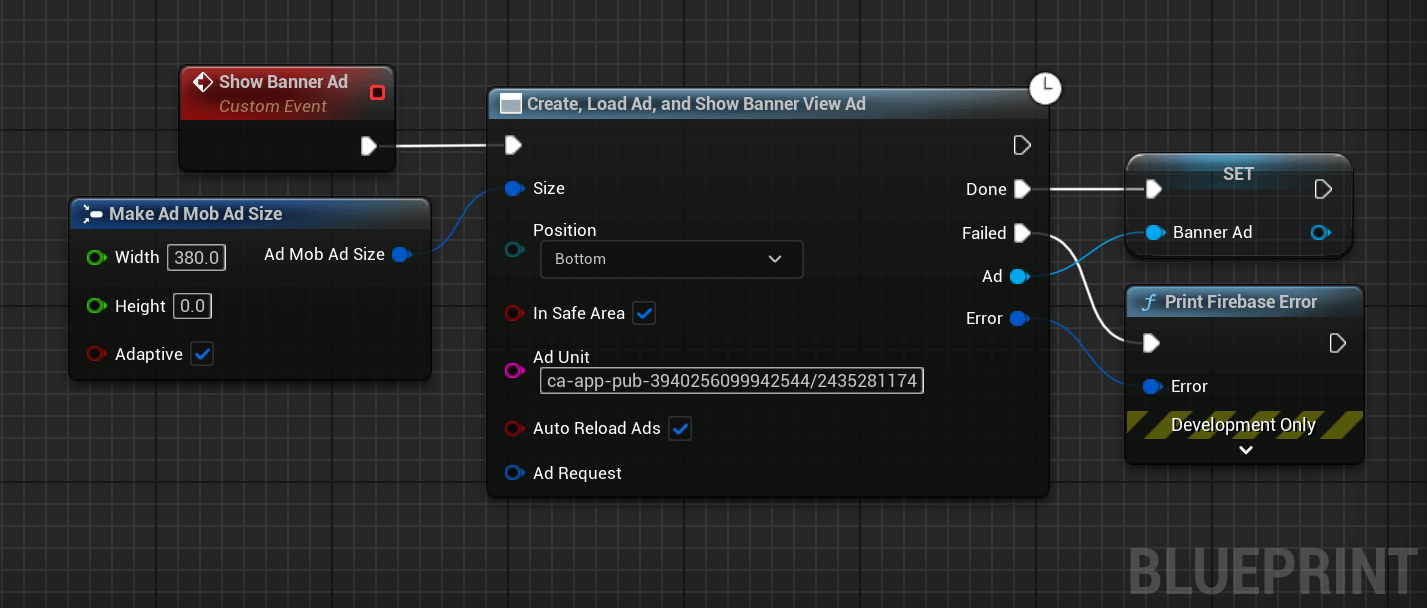
It is possible to easily show a banner using a helper node to create, load y show a banner view.
Make sure to keep the banner in a variable so it doesn't get garbage collected and removed from the screen.
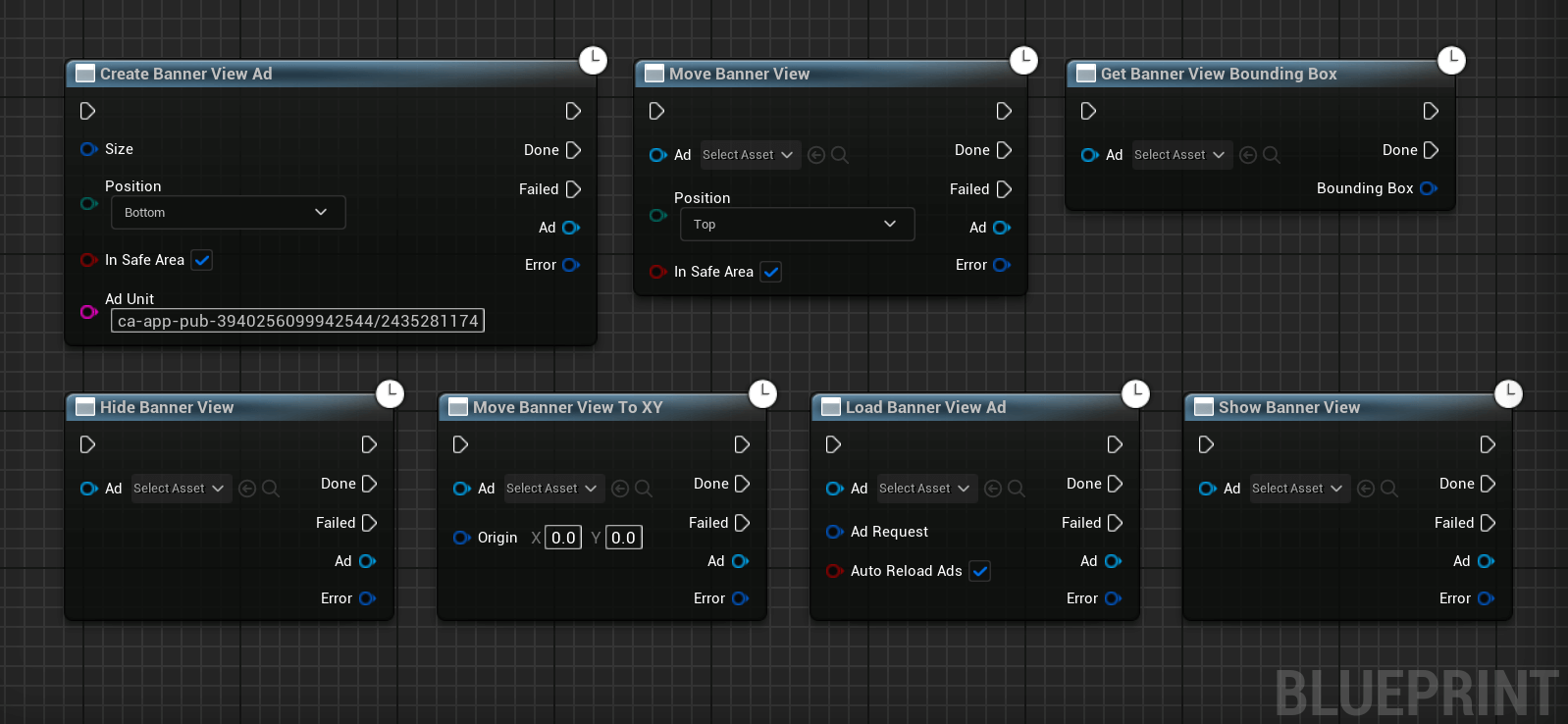
More methods are available to manage the banner:
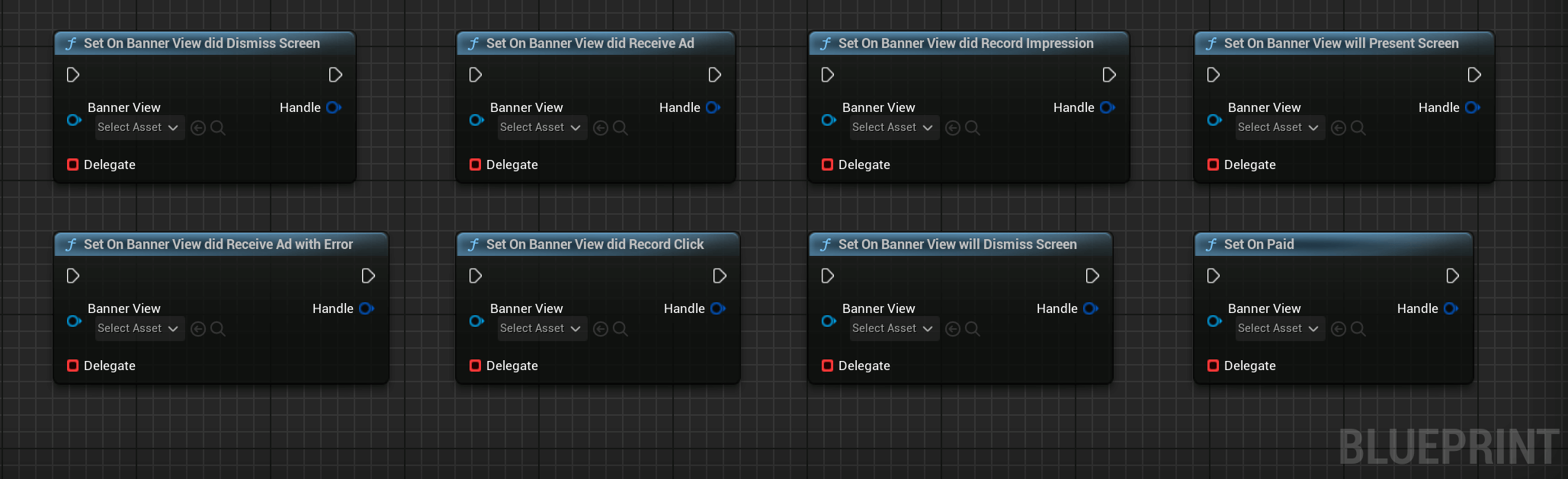
And it is possible to listen for multiple events emitted by the banner:
Interstitial Ads

Interstitial ads are full-page ad format that appear at natural breaks and transitions, such as level completion.
#include "AdMob/FbInterstitialAd.h"
/***********************************************
    Create an interstitial ad.
************************************************/
UInterstitialAd* Interstitial = NewObject<UInterstitialAd>();
/***********************************************
    Later, load the ad.
************************************************/
FAdMobAdRequest Request;
// Launch the load of the ad.
Interstitial->LoadAd(
    /* Unique identifier for this interstitial slot. */
    TEXT("ca-app-pub-3940256099942544/1033173712"),
    /* Our request */
    Request,
    /* Callback invoked once the ad is loaded or failed. */
    FFirebaseAdMobCallback::CreateLambda([](EAdMobError Error)
    {
        if (Error != EAdMobError::None)
        {
            // Failed to load the ad. Check the output log for the reason.
            UE_LOG(LogTemp, Error, TEXT("Failed to load interstitial (Error Code: %d)"), (int32)Error);
        }
        else
        {
            // Ad is loaded and ready to be shown.
        }
    }));
/***********************************************
    Finally, after the ad was loaded, show the ad.
************************************************/
/* Shows the interstitial. */
Interstitial->Show(FFirebaseAdMobCallback::CreateLambda([](EAdMobError Error)
{
    if (Error != EAdMobError::None)
    {
        // Failed to show the ad as something went wrong. Check the output log for reason.
        UE_LOG(LogTemp, Error, TEXT("Failed to show interstitial: %d"), (int32)Error);
    }
    else
    {
        // Ad is currently covering the UI.
    }
}));
The following Blueprint code can be used to show an interstitial ad using a helper node:
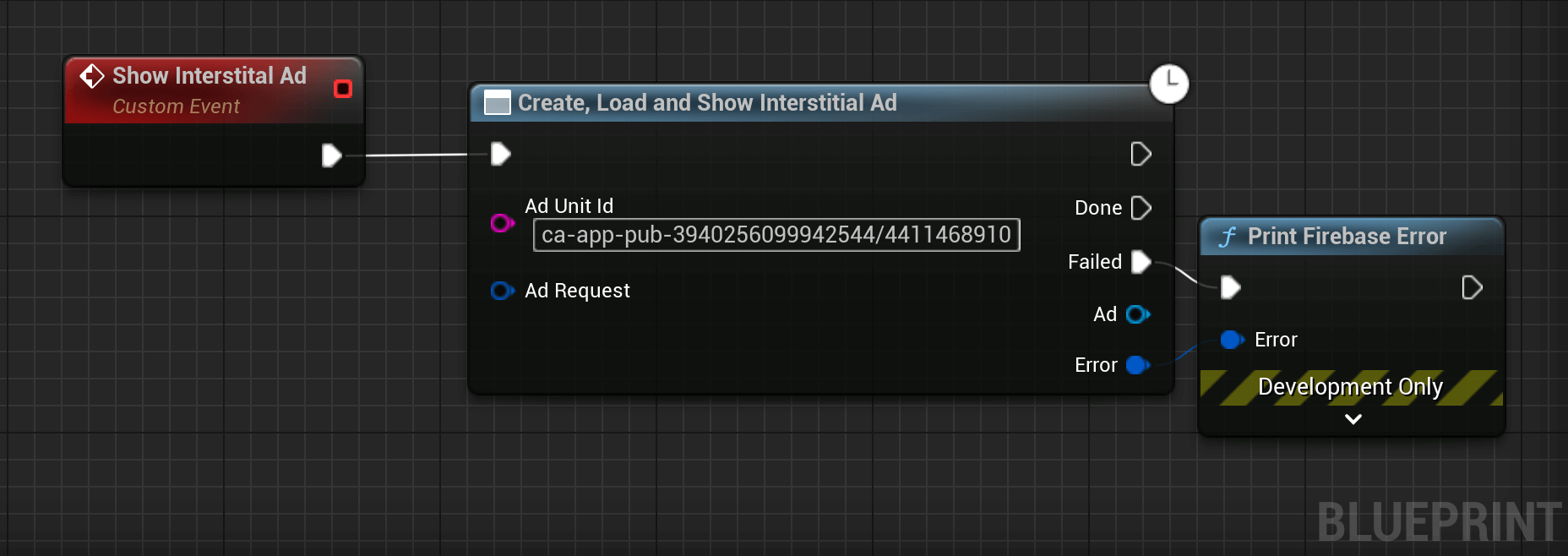
It is also possible to call each step separately, to preload ads for example:
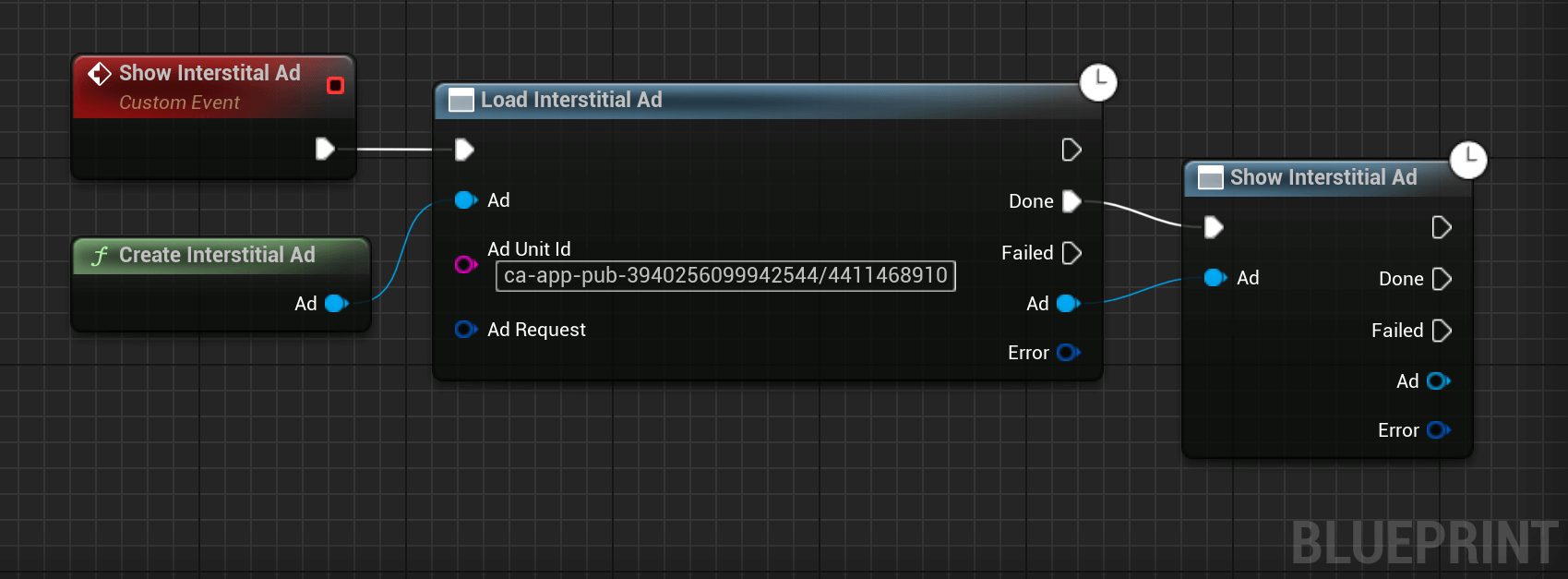
Multiple events are also available:
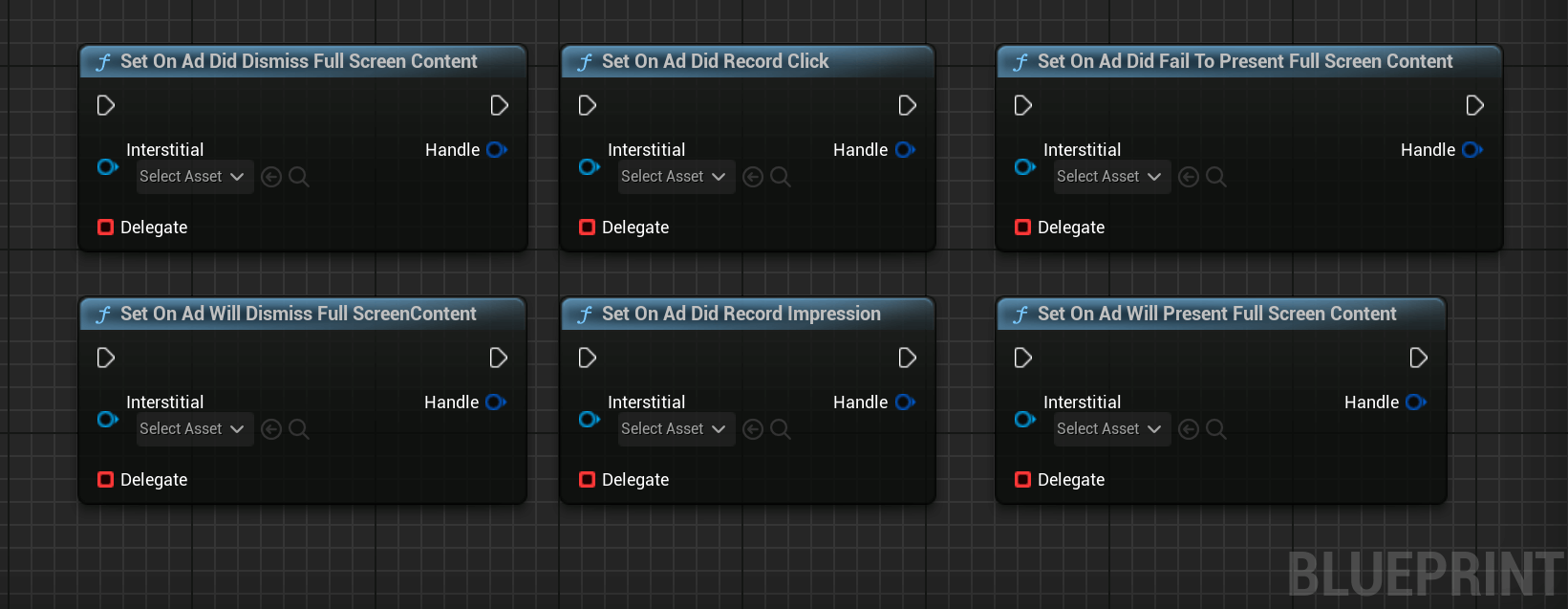
Rewarded Videos

Rewarded videos are ad formats that reward users for watching ads. They are great for monetising free-to-play users.
#include "AdMob/FbRewardedVideo.h"
/***********************************************
    Create a rewarded ad.
************************************************/
URewardedVideo* RewardedAd = NewObject<URewardedVideo>();
/***********************************************
    Handle the reward event.
************************************************/
RewardedAd->OnAdReward().AddLambda([](const FAdMobRewardItem& Reward)
{
    // This is where you grant the user their items/currency.
    UE_LOG(LogTemp, Log, TEXT("User rewarded: %f %s"), Reward.Amount, *Reward.Type);
});
/***********************************************
    Later, load the ad.
************************************************/
FAdMobAdRequest Request;
// Launch the load of the ad.
RewardedAd->LoadAd(
    /* Unique identifier for this rewarded slot. */
    TEXT("ca-app-pub-3940256099942544/5224354917"),
    /* Our request */
    Request,
    /* Server-side verification (optional) */
    {},
    /* Callback invoked once the ad is loaded or failed. */
    FFirebaseAdMobCallback::CreateLambda([](EAdMobError Error)
    {
        if (Error != EAdMobError::None)
        {
            // Failed to load the ad.
            UE_LOG(LogTemp, Error, TEXT("Failed to load rewarded ad (Error Code: %d)"), (int32)Error);
        }
        else
        {
            // Ad is loaded and ready to be shown.
        }
    }));
/***********************************************
    Finally, after the ad was loaded, show the ad.
************************************************/
/* Shows the rewarded ad */
RewardedAd->Show(FFirebaseAdMobCallback::CreateLambda([](EAdMobError Error)
{
    if (Error != EAdMobError::None)
    {
        // Failed to show the ad as something went wrong.
        UE_LOG(LogTemp, Error, TEXT("Failed to show rewarded ad: %d"), (int32)Error);
    }
    else
    {
        // Ad is currently covering the UI.
    }
}));
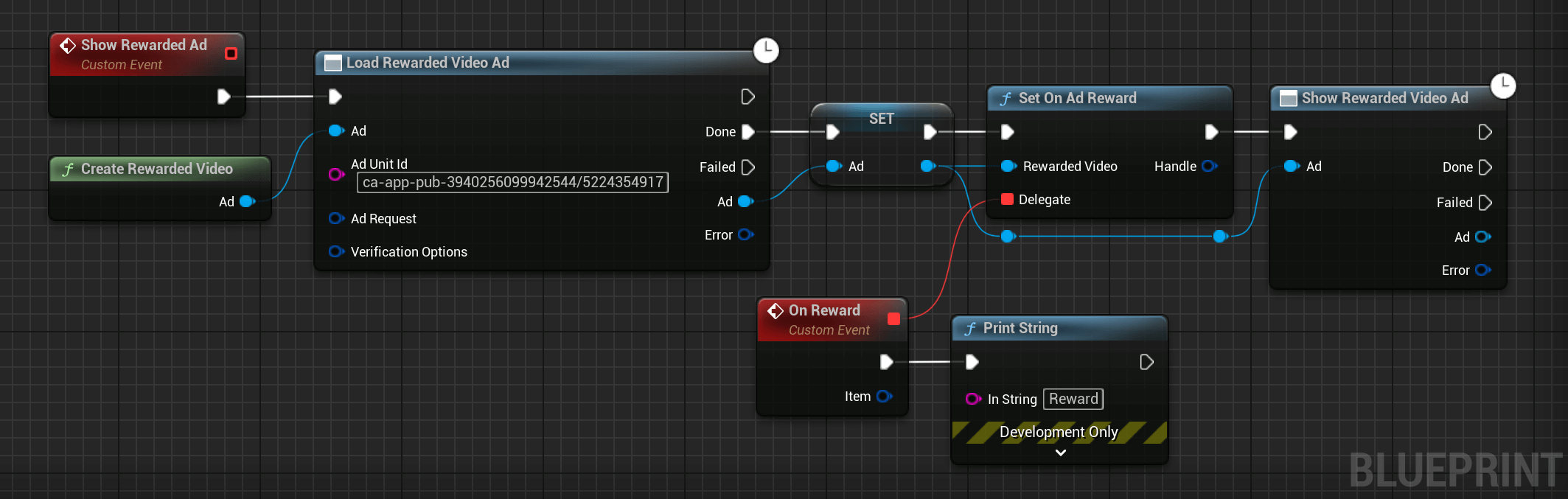
Here's how to show a Rewarded Video to your users:
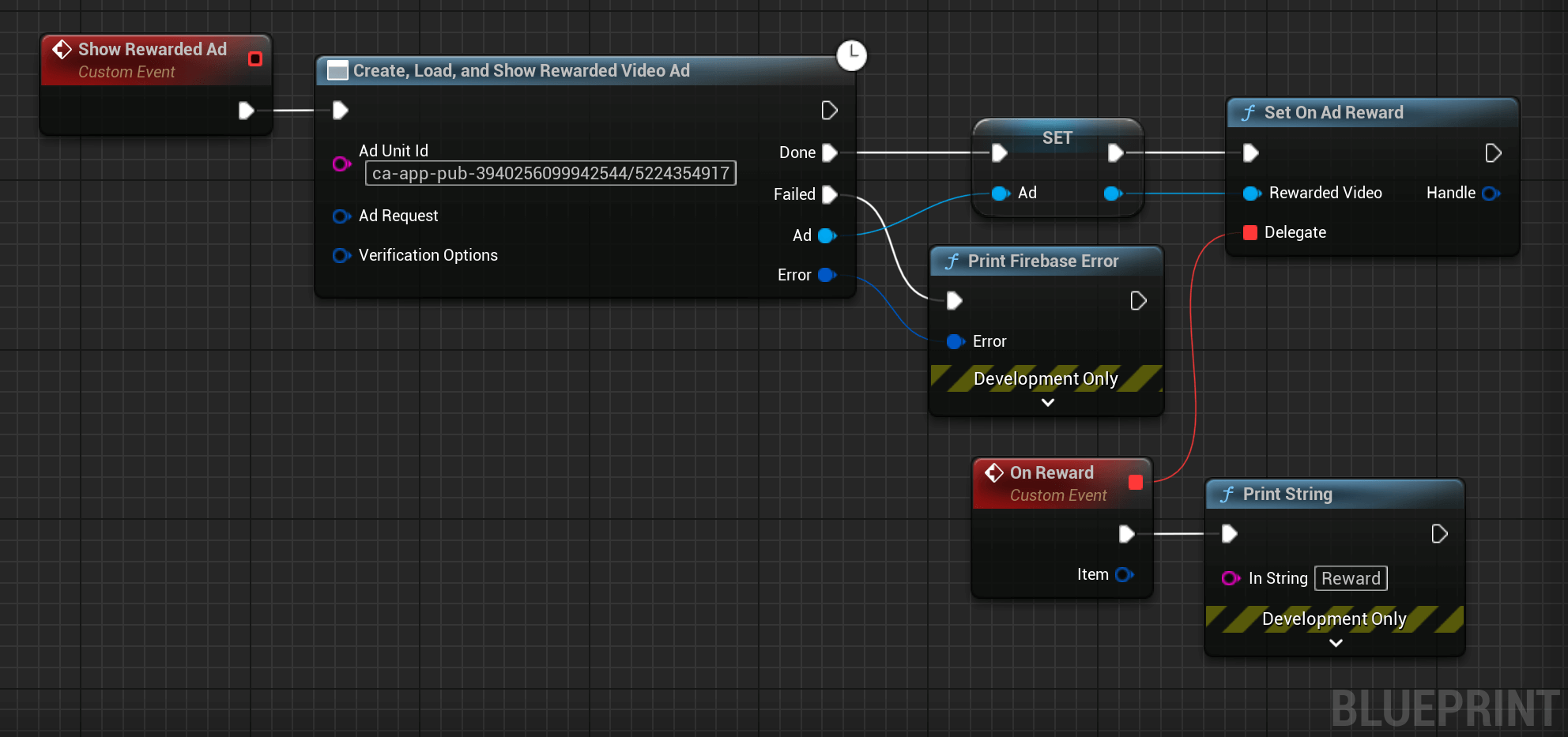
As Rewarded Videos take time to load, it is better to preload them before. The code can be modified to load an ad before showing it:
AppAbre Ads

App open ads are a special ad format intended for publishers wishing to monetize their app load screens. App open ads can be closed at any time y are designed to be shown when your users bring your app to the foreground.
// File containing the UAppOpenAd class.
#include "AdMob/FbAppOpenAd.h"
/***********************************************
    Create an ad.
************************************************/
UAppOpenAd* Ad = NewObject<UAppOpenAd>();
/***********************************************
    Later, load an ad.
************************************************/
// Create the ad request.
FAdMobAdRequest Request;
Request.Keywords = { TEXT("game"), TEXT("fun") };
// Launch the load of the ad.
Ad->Load(
   /* Ad Unit ID */
   TEXT("ca-app-pub-3940256099942544/5575463023"),
   /* Our request */
   Request,
   /* Callback when the ad is loaded. */
   FFirebaseAdMobCallback::CreateLambda([](FFirebaseError Error)
   {
      if (Error != EAdMobError::None)
      {
         // Failed to load the ad as something went wrong. Check the output log for the reason.
         UE_LOG(LogTemp, Error, TEXT("Failed to load an ad: %s"), *Error.Message);
      }
      else
      {
         // Ad is loaded and ready to be shown.
      }
   })
);
/***********************************************
    Finally, after the ad was loaded, show the ad.
************************************************/
/* Shows the ad */
Ad->Show(FFirebaseAdMobCallback::CreateLambda([](FFirebaseError Error)
{
   if (Error != EAdMobError::None)
   {
      // Failed to show the ad as something went wrong. Check the output log for reason.
      UE_LOG(LogTemp, Error, TEXT("Failed to show ad: %s"), *Error.Message);
   }
   else
   {
      // Ad is currently on screen.
   }
});
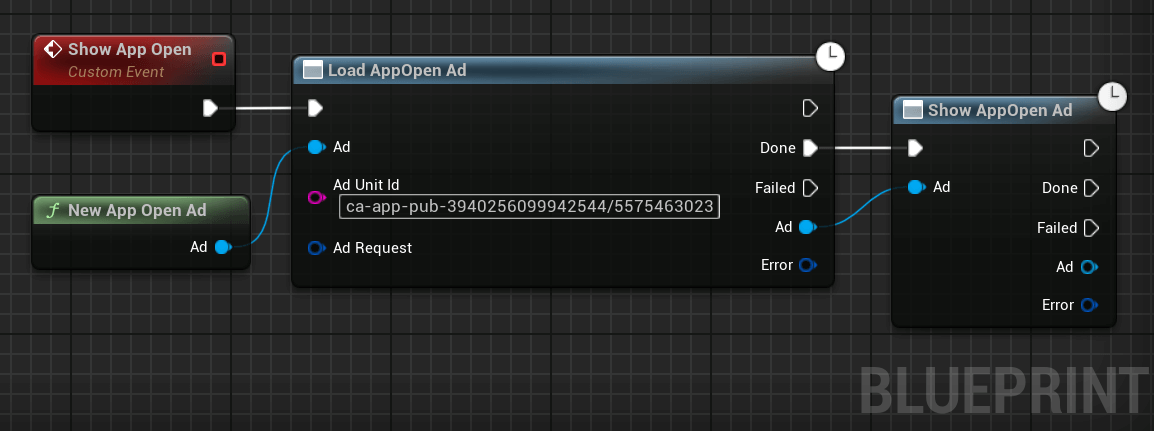
A helper method can be used to quickly implement AppAbre ads:
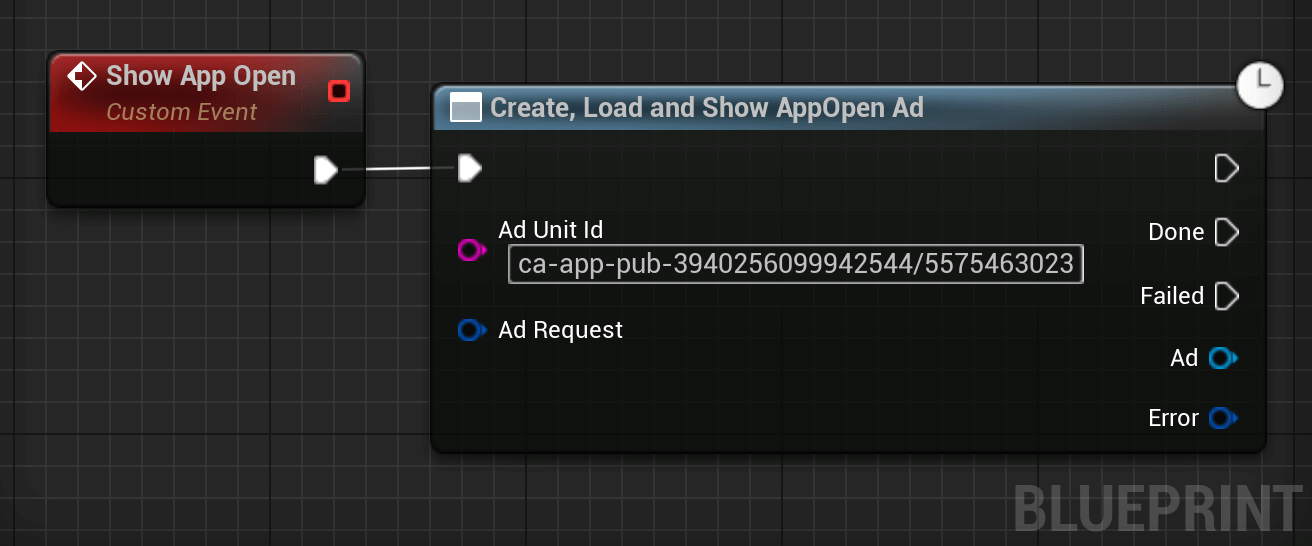
It is also possible to call the three functions separately: New App Open, Load Ad y Show Ad to be able to pre-load ads.