GraphQL Client for Unreal Engine
A production-ready, high-performance network client built to integrate GraphQL APIs natively into Unreal Engine. Execute queries and mutations completely non-blocking via C++ or optimized Async Blueprint nodes, manage text-based queries seamlessly, and parse complex relational responses with zero boilerplate.
Features
Out-of-the-box support for queries, mutations, complex operation names, and dynamic JSON variables.
Stop pasting massive, unformatted query text blocks into Blueprints or C++. Load and execute .graphql or .txt files directly from your game's content directory.
Native FGraphQLValue wrapper enclosing nested array/object topologies via a unified type engine.
Define clean fallback defaults inline directly within your graphs for optional or null schema fields, eliminating branching boilerplate.
Installation
- Get the GraphQL Client plugin from Fab.
- Click Install to Engine from the Epic Games Launcher to add it to your Unreal Engine installation.
- Open your project, navigate to Edit > Plugins, search for GraphQL Client, and check Enabled.
- Restart the Unreal Editor.
Blueprint Workflows
1. Creating & Initializing the Client
Before you can make any network requests, you must construct and configure your persistent client instance using the static factory node.
The client is UObject-based, and can be stored in the GameInstance for example to persist level changes.
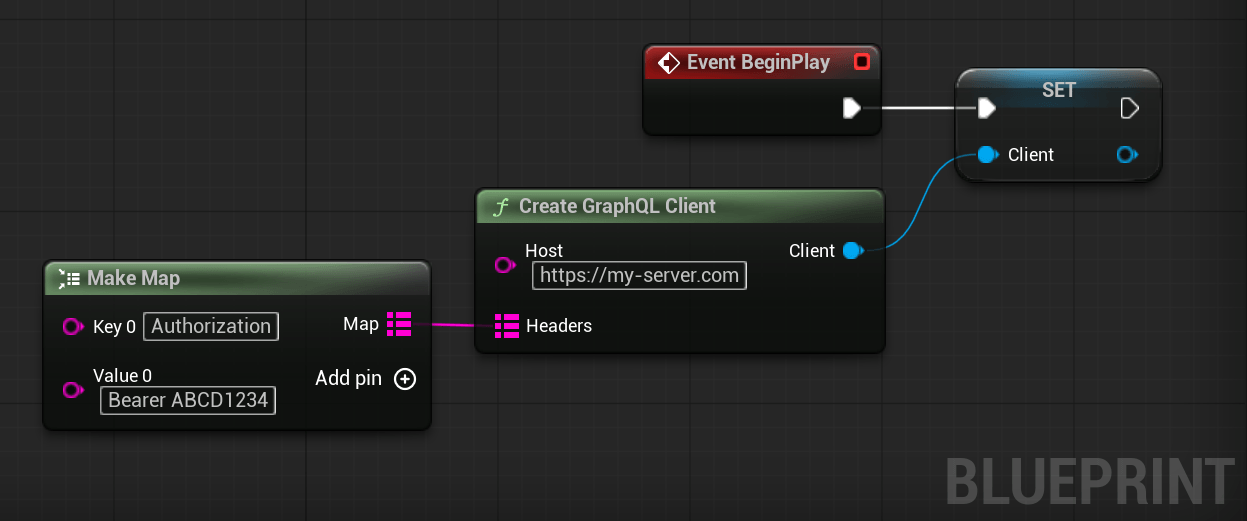
- Create Client: Use the Create GraphQL Client node.
- Configure Endpoint & Headers: Pass your GraphQL API endpoint URL (e.g.,
https://api.yourgame.com/graphql) and optional initial headers directly to the constructor node. - Dynamic Modifiers: Use Set Host or Set Header dynamically at runtime to modify authorization states or update endpoints.
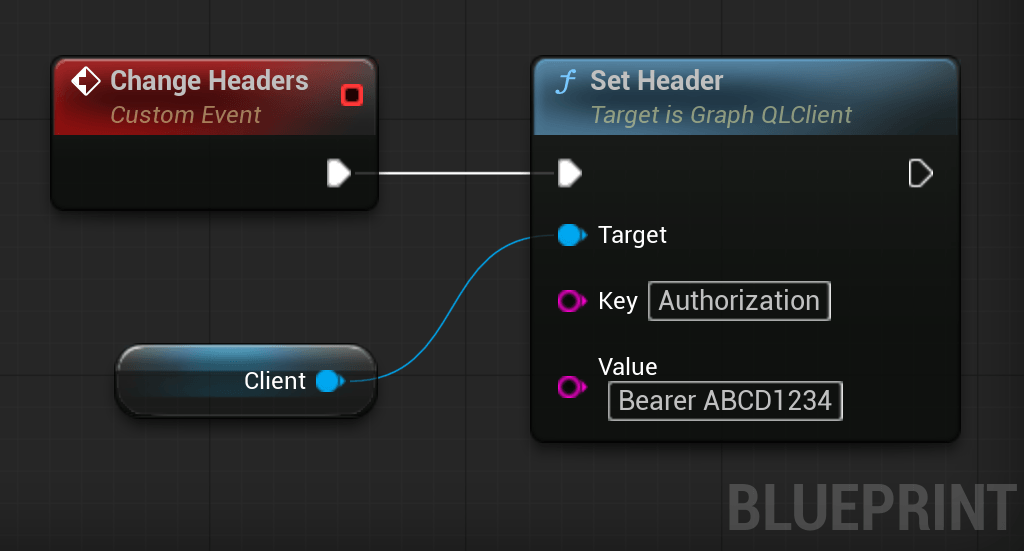
2. The Async Execution Node
Place the Execute GraphQL Query async node anywhere in your graphs to fetch data asynchronously.
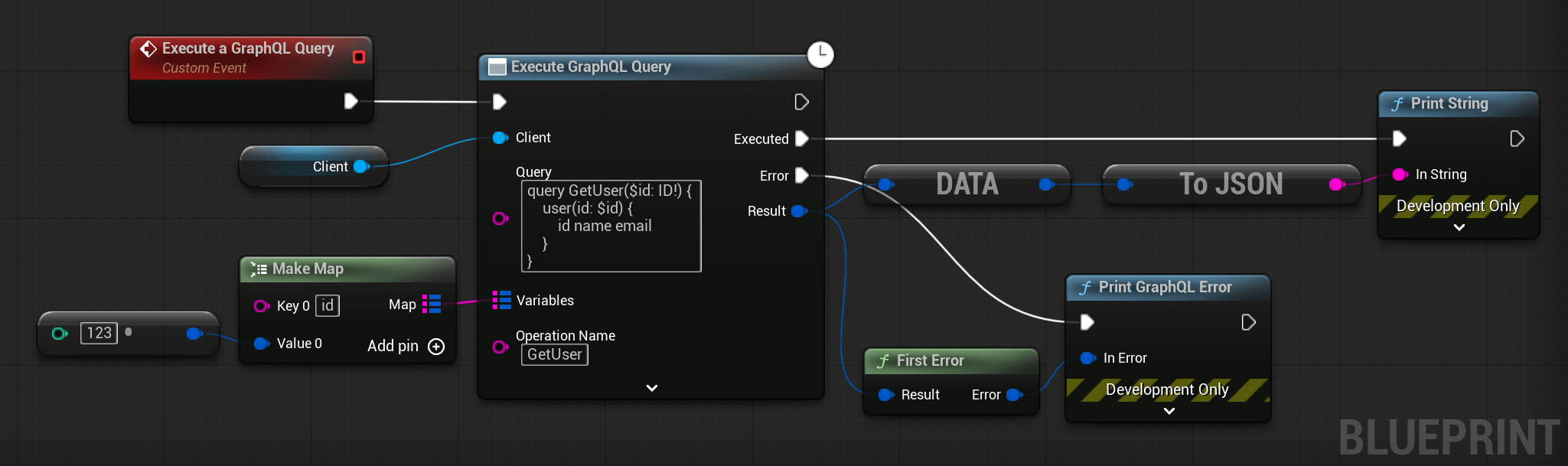
- Client Reference: Connect your initialized
GraphQLClientinstance to the target pin. - Query Input: Input your raw GraphQL query/mutation syntax directly into the multi-line pin.
- Variables Input: Pass parameters dynamically using a map constructed from native type conversion nodes (
->). - Execution Routing: Use the explicit
Executed(Success) andError(Failure) pins to safely handle your network responses without nesting branching logic. Both pins carry theFGraphQLResultpayload for custom processing.
3. Disk-Based Execution (ExecuteFile)
Avoid embedding massive, unformatted query strings inside your graphs.
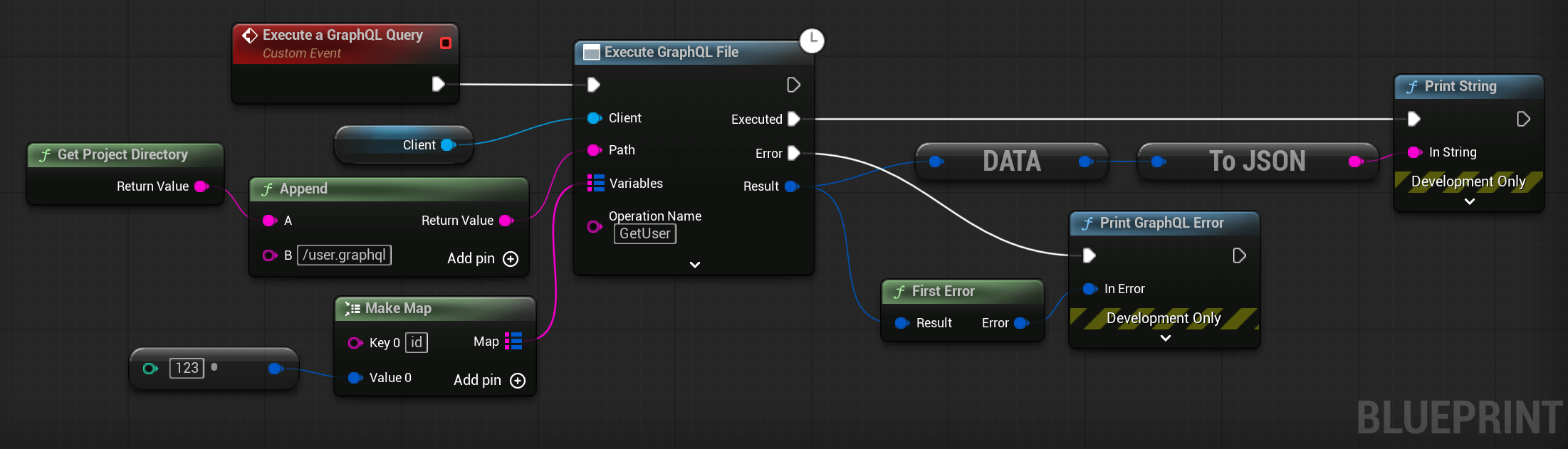
- Save your queries as
.graphqlor.txtassets inside your project content directory (e.g.,/Content/Queries/GetInventory.graphql). - Use the Execute GraphQL File node and point the path pin directly to that relative content path.
- This allows designers and backend engineers to modify queries externally in their favorite IDE without changing or recompiling Blueprint graphs.
4. Rapid Data Extraction (WalkResult Node)
Since GraphQL payloads are deeply nested, use the built-in path navigation helpers to pluck fields in one step instead of chaining multiple nested object getters.
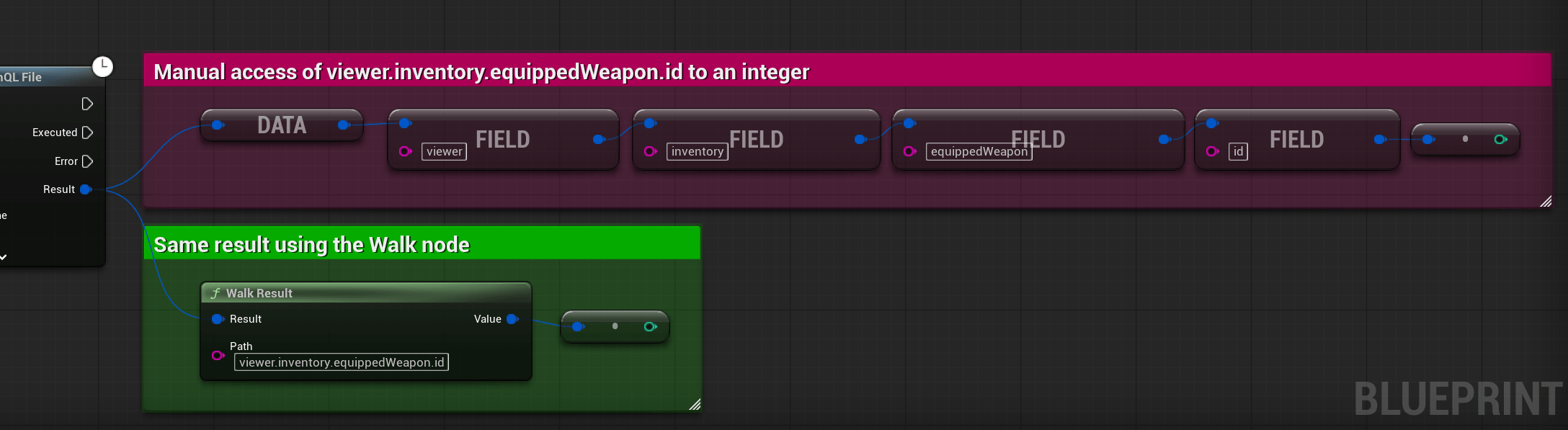
- Provide a simple dot-notation path, such as
viewer.inventory.equippedWeapon.id. - The node instantly resolves and returns the specific target value.
- Array Index Access:
WalkResultcan also access indexed arrays directly. For example, passingusers.3.namewill resolve and return the name of the fourth element (index 3) in the users array.
5. Array & Nested Object Parsing
While WalkResult is ideal for extracting singular nested fields, complex responses often return JSON objects or lists (arrays) that require manual iteration and destructuring. The Blueprint library provides clean conversion nodes to handle these structures.
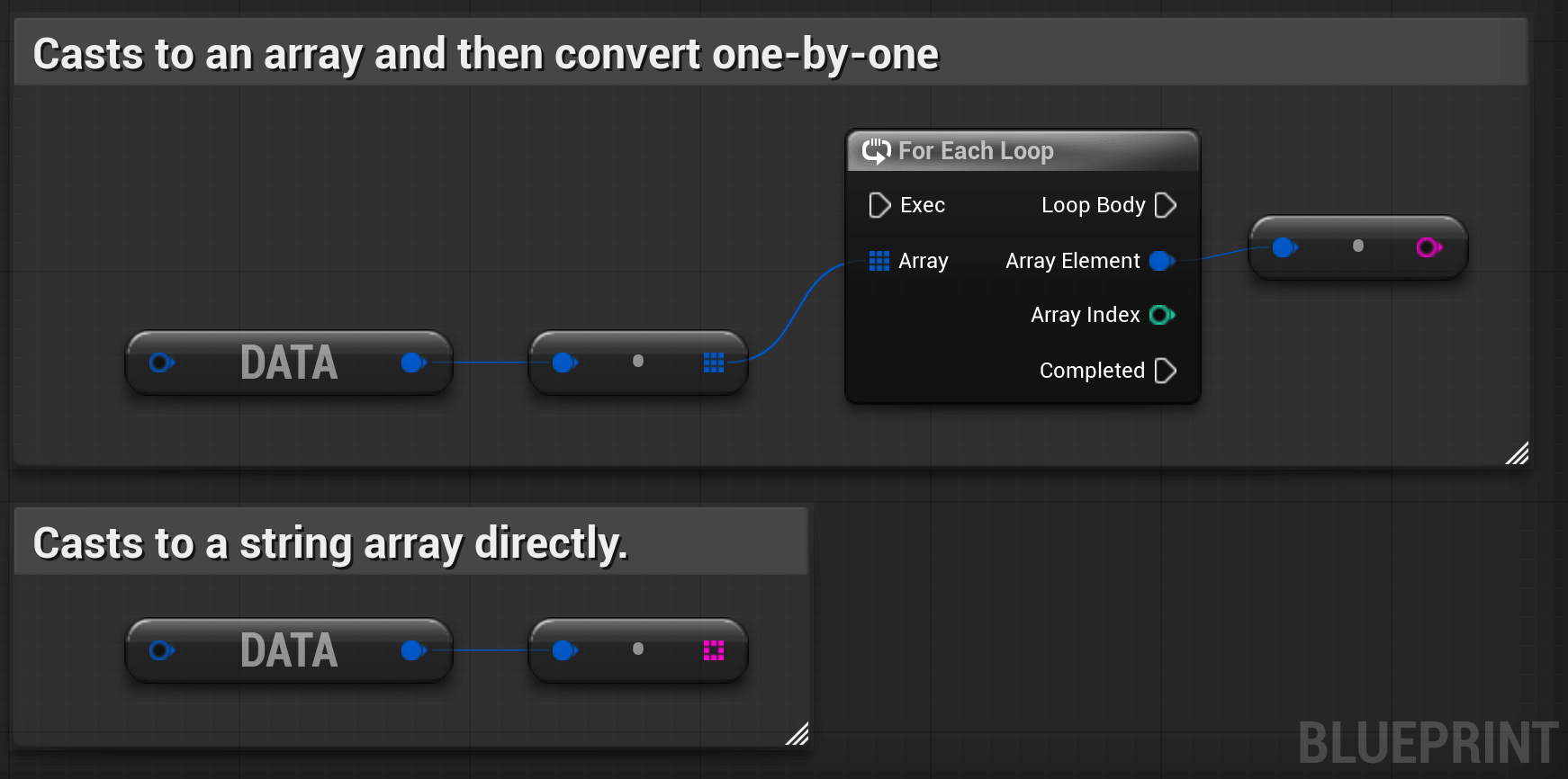
- Array Extraction: Convert list payloads directly using typed helpers to avoid manual element conversion:
AsStringArray/AsIntArray/AsInt64ArrayAsBoolArray/AsFloatArray/AsDoubleArray/AsByteArray
- Iterating Generic Arrays: For mixed arrays or arrays of nested objects, extract them using
AsArrayto get aTArray<FGraphQLValue>. You can then loop through them with a standard Blueprint ForEachLoop. - Object Key Traversal: Extract values using the
GetFieldnode. You can convert the object representation into a key-value map usingAsObjectfor dynamic property scanning.
6. Inline Fallback Assignment (Coalesce Nodes)
GraphQL properties are nullable by default. Assign default fallback values inline without messy branching conditions or select nodes.
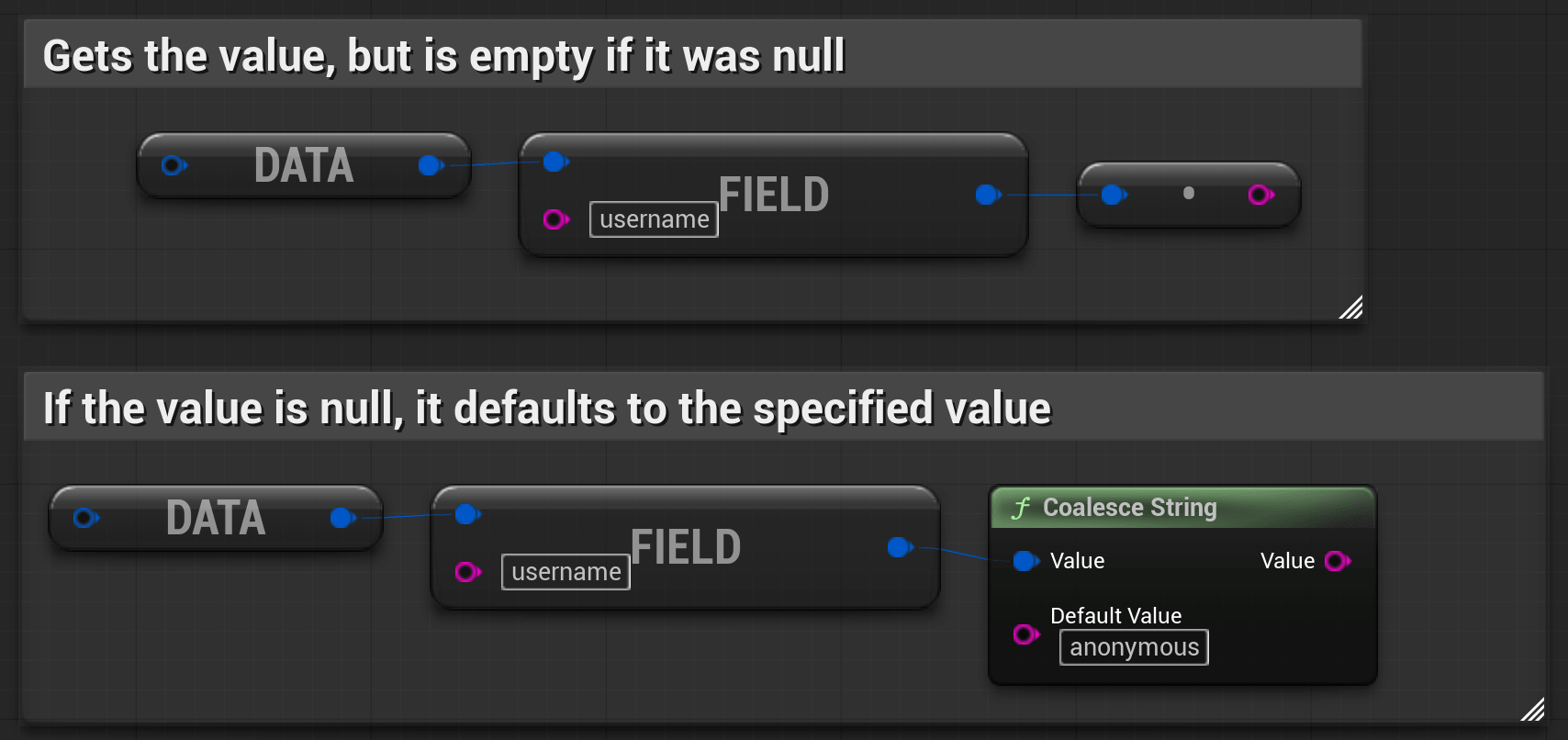
- Route your extracted value through any helper in the Coalesce suite:
CoalesceStringCoalesceInt/CoalesceInt64CoalesceFloat/CoalesceDouble
- If the server returns a null value for an optional field, the node instantly substitutes it with your defined fallback default value inline.
7. JSON Serialization (ToJSON Node)
For logging, saving data locally, or passing raw payloads to other subsystems, you can serialize any FGraphQLValue back into a standard formatted JSON string.

- Serialization: Use the To JSON node to easily dump complex nested GraphQL values or complete data payloads into standard string outputs.
C++ Quick Start
If you are working in a C++ project, first open your project's *.Build.cs file and add the module dependency:
PublicDependencyModuleNames.AddRange(new string[] { "GraphQLClient" });1. Initializing the Client
Create and configure an instance of the GraphQL client using the static factory method or standard initialization.
#include "GraphQL.h"

// Optional initial headers
TMap<FString, FString> Headers;
Headers.Add(TEXT("Authorization"), TEXT("Bearer your_jwt_token"));

// Create the client instance using the static factory
UGraphQLClient* const Client = UGraphQLClient::CreateClient(
  TEXT("https://api.yourgame.com/graphql"),
  Headers
);

// Modify endpoints or headers later if needed
Client->SetHeader(TEXT("X-Custom-Header"), TEXT("CustomValue"));
2. Executing a Query with Variables
Pass variables dynamically using FGraphQLValue maps and handle the async delegate callback.
// Construct native variables using FGraphQLValue constructor wrappers
TMap<FString, FGraphQLValue> Variables;
Variables.Add(TEXT("playerId"), FString(TEXT("PLR_89234")));

FString Query = TEXT("query GetPlayer($playerId: ID!) { player(id: $playerId) { name gold } }");

// Bind to delegate callback and execute
Client->Execute(
  Query,
  Variables,
  FGraphQLResultDelegate::CreateUObject(this, &AMyGameMode::OnPlayerLoaded)
);

// Callback Implementation
void AMyGameMode::OnPlayerLoaded(const FGraphQLResult& Result)
{
    if (!Result.HasErrors())
    {
        // Extract nested fields safely from the FGraphQLValue "Data" property
        FGraphQLValue Player = Result.Data.GetField(TEXT("player"));

        FString Name = Player.GetField(TEXT("name")).AsString();
        int32 Gold = Player.GetField(TEXT("gold")).AsInt();

        UE_LOG(LogTemp, Log, TEXT("Player %s loaded with %d gold."), *Name, Gold);
    }
    else
    {
        // Output error messages from the payload
        for (const FGraphQLError& Error : Result.Errors)
        {
            UE_LOG(LogTemp, Error, TEXT("GraphQL Error [%d]: %s"), Error.Code, *Error.Message);
        }
    }
}
Support
For support or feature requests, please contact us directly at pandores.marketplace@gmail.com.