Easy Email Plugin
Welcome to the quick start technical documentation for the Easy Email plugin, a performance-optimized integration tool designed for Unreal Engine. Efficiently connect your game or application to any reliable SMTP server to deploy secure messaging pipelines directly via Blueprints or high-performance C++ code execution.
Download Easy Email
Before you start
Configuration
Easy Email allows you to connect to an SMTP server to send emails. You must use the server corresponding to the email address you want to use to send the email. Here is a list of common SMTP servers:
| Email extension | Server Type | Server Address | Security | Port | Requires Authentication |
|---|---|---|---|---|---|
| @gmail.com | ESMTP | smtp.gmail.com | SSL/TLS | 465 | Yes |
| @gmail.com | ESMTP | smtp.gmail.com | StartTLS | 587 | Yes |
| @yahoo.com | ESMTP | smtp.mail.yahoo.com | SSL/TLS | 465 | Yes |
| @aol.com | ESMTP | smtp.aol.com | SSL/TLS | 465 | Yes |
| @hotmail.com | ESMTP | smtp.live.com | SSL/TLS | 465 | Yes |
| @outlook.com | ESMTP | smtp.live.com | StartTLS | 587 | Yes |
C++
Includes
Easy Email has two files to include.
#include "Email.h"
#include "EmailLibrary.h"
Email.h contains everything we need to send emails and EmailLibrary.h contains a few helper functions that you shouldn't need. They are used internally by Email.h for you but are available if needed.
Functions
The functions are the same for Blueprints and C++. C++ however doesn't have the helper nodes that are Blueprints only.
Additional notes
Additional logging
If you want additional logs, you have to enable Verbose and/or VeryVerbose logs.
To do so, open MyGame/Config/DefaultEngine.ini and add the following:
[Core.Log]
LogEasyEmail=VeryVerbose
Passwords
If the SMTP server requires authentication, you should not send passwords without using an encrypted connection (SSL/TLS or StartTLS).
Attachments
If you add an attachment as a file to an email, the file is only loaded outside of the game thread just before sending the email and is then cached within the email. If you let the MIME-Type of the attachment empty, Easy Email will try to match the file's extension with its default MIME-Type and use application/octet-stream if none is found or the extension is unknown.
Blueprint Example
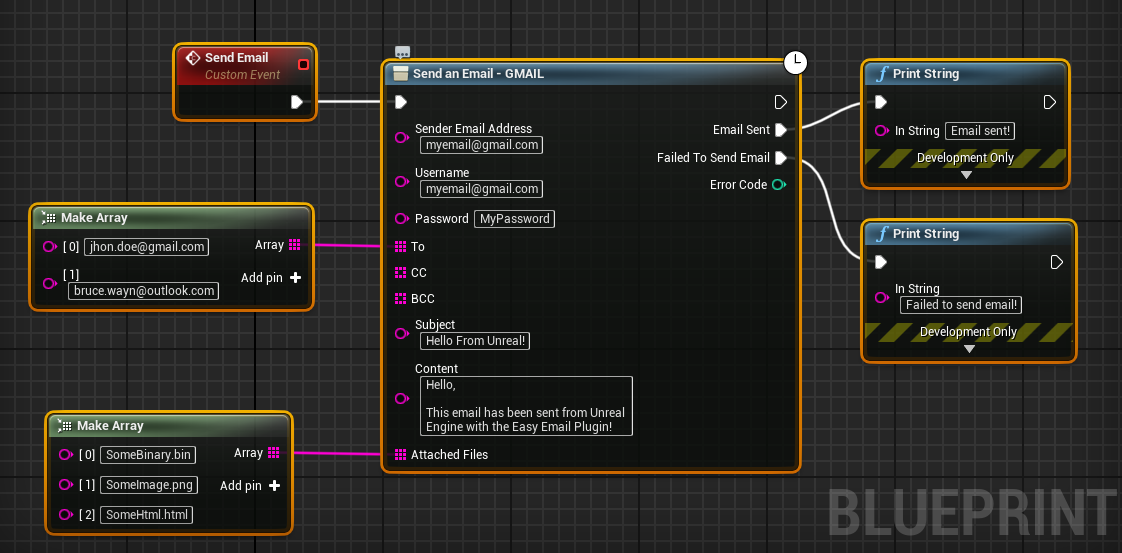
Send an email with a Gmail account
Sending an email is really easy and straightforward with the helper nodes:
Send an email with a custom SMTP server
An helper node for custom SMTP servers exists too:
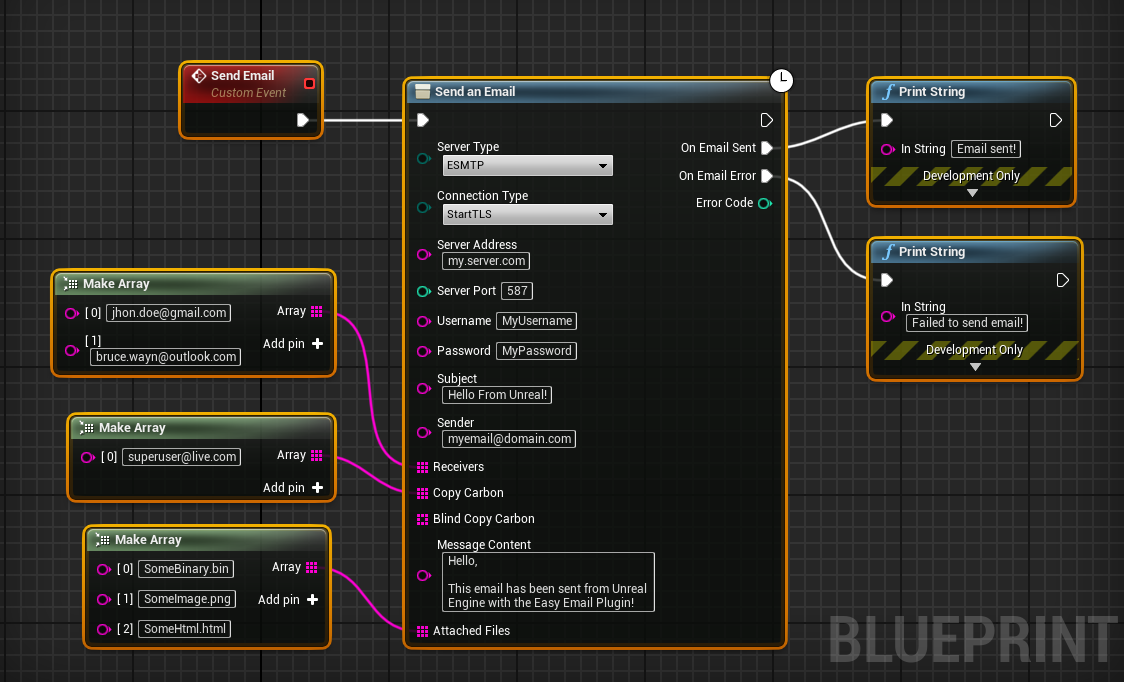
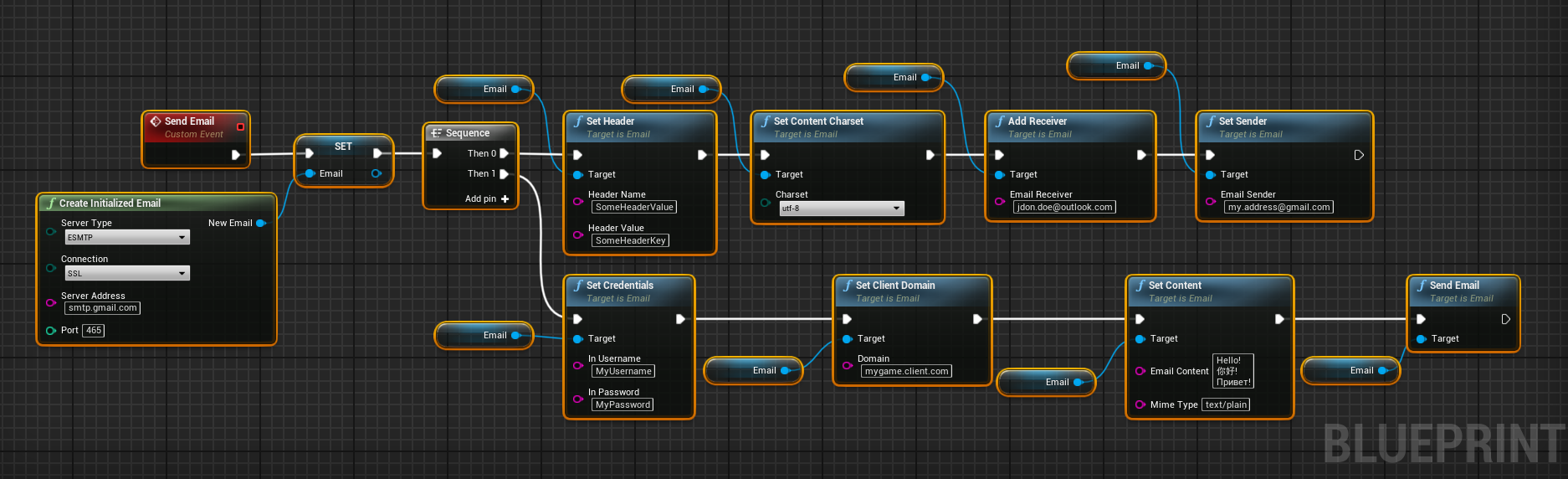
UTF-8 and text/plain for the content encoding. If you want to use another charset or MIME-Type, you can't use the helper node at the moment and have to customize your email as shown below.Customized email
If you need to customize the email, the same functionalities are offered for Blueprints and C++. However, it is longer and more complicated than the helper nodes:
C++ Example
Send an email with a Gmail account
MyClass.h
#pragma once

#include "Email.h"
#include "CoreMinimal.h"
#include "MyClass.generated.h"

UCLASS()
class UMyClass : public UObject
{
    GENERATED_BODY()
public:
    void SendEmail();

    UFUNCTION()
    void OnEmailError(const int32 ErrorCode)
    {
        UE_LOG(LogTemp, Error, TEXT("Failed to send email. Code: %d."), ErrorCode);
    }
    UFUNCTION()
    void OnEmailSent()
    {
        UE_LOG(LogTemp, Log, TEXT("Email sent."));
    }
private:
    UPROPERTY()
    UEmail* Email;
};
MyClass.cpp
#include "MyClass.h"

void UMyClass::SendEmail()
{
    Email = UEmail::CreateEmail();

    Email->SetServerAddress (TEXT("smtp.gmail.com"));
    Email->SetServerPort    (465);
    Email->SetConnectionType(ESmtpConnectionType::SSL);
    Email->SetServerType    (ESmtpServerType::ESMTP);

    Email->SetCredentials(TEXT("MyUsername"), TEXT("MyPassword"));

    Email->SetSender         (TEXT("myemail@gmail.com"));
    Email->AddReceiver       (TEXT("target@gmail.com"));
    Email->AddBlindCopyCarbon(TEXT("bcc@gmail.com"));
    Email->AddCopyCarbon     (TEXT("cc@gmail.com"));

    Email->SetSubject       (TEXT("Hello From Unreal"));
    Email->SetContent       (TEXT("Hello there, this is the Easy Email Plugin."));
    Email->SetContentCharset(EEmailCharset::utf_8);

    Email->AddFileAsAttachment(TEXT("MyLogo.png"),    TEXT("C:/Users/Me/Logo.png"));
    Email->AddFileAsAttachment(TEXT("MyRawData.bin"), TEXT("C:/Users/Me/binary.bin"), TEXT("application/octet-stream"));

    Email->OnEmailError.AddDynamic(this, &UMyClass::OnEmailError);
    Email->OnEmailSent .AddDynamic(this, &UMyClass::OnEmailSent);

    Email->Send();
}
Troubleshooting
Failed to connect: SSL error: unable to get local issuer certificate
This error happens because the SSL certificate is not included in the packaged version of your game. To add the certificate to the packaged version, you need to do the following:
- Copy the
.pemcertificate file to the location<Project>/Content/Certificates/cacert.pem. - Add the certificate to the files to copy into the packaged build into
Settings>Packaging>Packaging>Additional Non-Assets Directories To Copy.
Gmail - Invalid Password
If your password is not accepted by Gmail, you need to setup an app password. Instructions can be found here.
Support
If you need help, have a feature request or experience troubles, please contact us at pandores.marketplace@gmail.com.